
Reconciliation
Why a device can be held, what the Reconciliation Required screen does, and how a manager releases it.
The Smart Safe Client keeps its own count of the money in each device. Before every operation, it compares that count with what the device itself reports. If they do not match, or if an operation stopped halfway and nobody knows exactly how much moved, the device is held: it does not run any money operation until a person with permission checks it.
This protects everyone: nobody deposits or withdraws on top of a figure that is wrong.
Did an operation stop on an error, or did an INCIDENT NOTICE print?
Follow the step-by-step guide, with its flow chart, for the Cash Infinity and the DE-70: what to do with the money and the papers, how to reset the device on the Maintenance screen, and how to resolve what is left on the Reconciliation Required screen. It is in An error in the middle of an operation
When a device is held
- The money in the device does not match the Smart Safe Client's count, for example because someone took out or put in notes outside the Smart Safe Client.
- An operation stopped in the middle because of a device error, and the device could not be read afterwards.
- On the DE-70, notes taken out of the escrow during an error were not put back.
- A collection was not performed or timed out: the safe was opened, but the collection was not confirmed.
How you notice
- On the home screen, the device's tab shows a warning triangle, and the Needs reconciliation sign appears above the buttons.
- Any money operation on that device says "This device is on hold for reconciliation — it can't run operations until it is reconciled" and opens the Reconciliation Required screen.
- The Maintenance and Inventory screens still open normally.

The Reconciliation Required screen
Open it by tapping Needs reconciliation on the home screen.
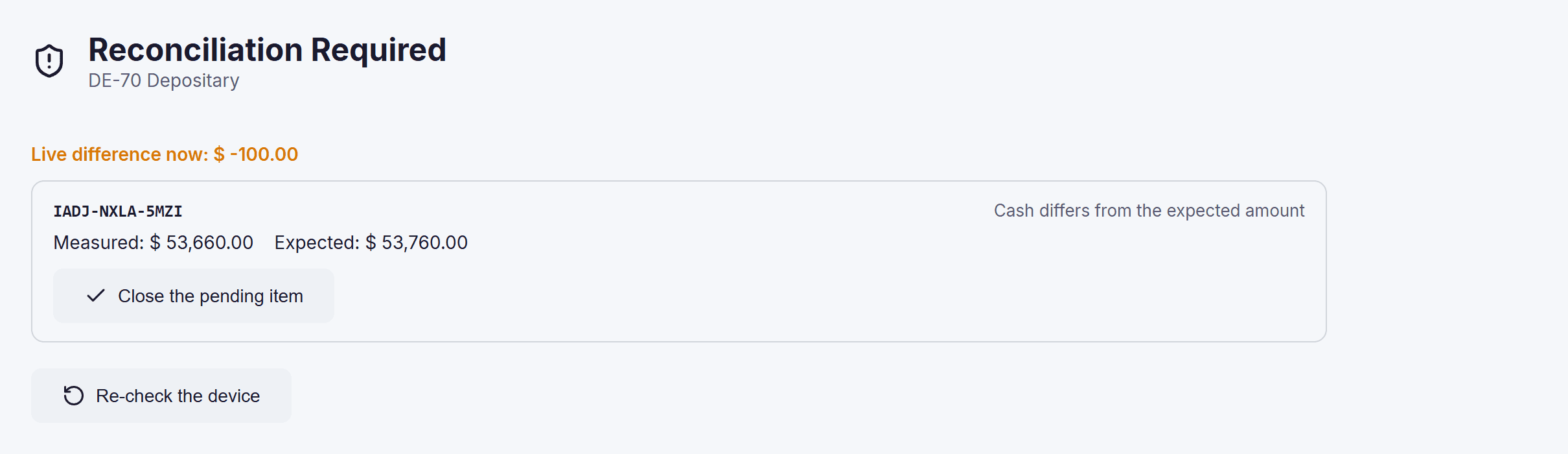
When it opens, the Smart Safe Client first tries to settle on its own what it can: it reads the device, finishes the operations it can confirm, and prints the receipts that were missing (marked FIRST RECEIPT). If that is enough: "Nothing to reconcile — this device is balanced and back in service".
What is left is listed, one item per operation:
- Its reference and the reason, for example "Cash differs from the expected amount".
- Measured (what the device has), Expected (what the count says) and, for an envelope, Declared.
- Live difference now: the difference at this moment.
Resolve it
Only profiles with the Reconcile held devices permission can resolve the items: in a new installation, the Administrator and the Manager. Anyone else sees "This device requires a manager to reconcile it".
| Button | When to use it |
|---|---|
| Close the pending item | The device is ready and the difference was checked. The item is closed at the amount the device measured, and a paper prints: the operation's receipt marked CLOSING RECEIPT, or, for a difference in the count, an INVENTORY ADJUSTMENT slip with the decision and the name of who authorised it. |
| Release the machine | The device kept counted money inside an operation it could not finish (or, on the DE-70, is waiting for notes that were taken out of the escrow). It resets the device and records what the device says it received. |
| Re-check the device | Reads the device again, for example after fixing something. |
| Go to Maintenance | Appears when the device is not ready (in error, or with notes left in the escrow): reset it there first, then come back. |
Before closing, find the cause
Close the pending item accepts the device's figure as the truth. There is no need to count the safe by hand: the device counts its own money, and that is Measured. What you have to find out is why it differs from Expected: look at the device's last operations on the Reports screen and, if possible, check with the technician who recovered the device what happened, and whether any money was taken out of it during the recovery. The INVENTORY ADJUSTMENT slip is an internal record, not proof that anyone received or handed over cash. What to check for each reason: The reason of a pending item
In the reports
Every resolution leaves its trace in Reports: the held operation shows how it was closed, and a Reconciliation Adjustment with the same code (for example RADJ-NXLA-5MZI for IADJ-NXLA-5MZI) records who decided, when, and at what amount.