
4. License
How to activate the Smart Safe Client on a new computer.
Each computer needs its own license. The license is tied to that computer: if the motherboard, the disk or the network card is replaced, a new license is needed.
Three codes not to mix up
| Code | What it is | Where you see it |
|---|---|---|
| Requester Key | Your personal technician key (format XXXX-XXXX). | You create it yourself on the portal, in Requester keys, and it is the same one as in the Token Generator |
| Device code | Identifies this computer. | On the activation screen, at the bottom, with the Copy button. |
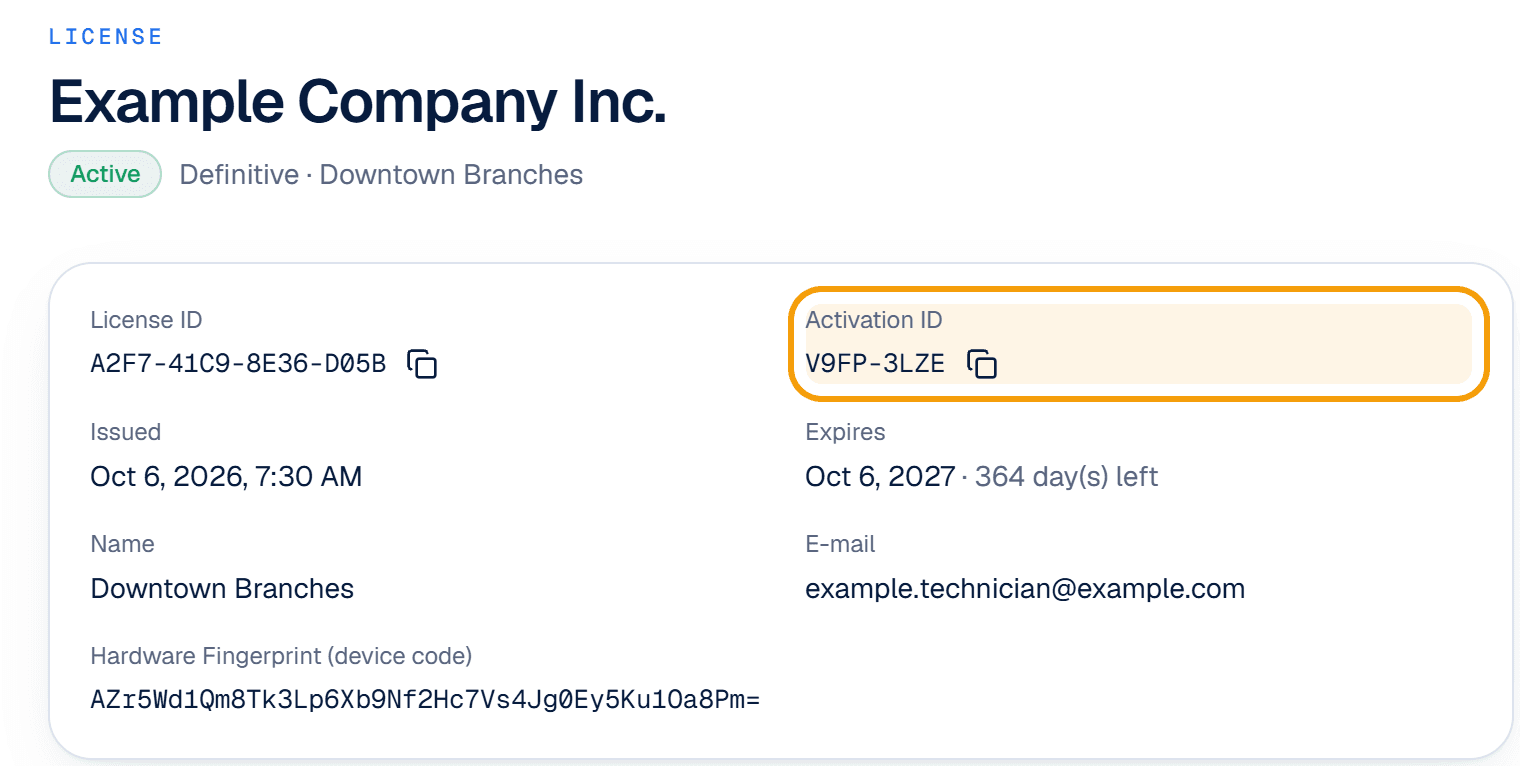
| Activation ID | Identifies a license that has already been approved. | In the approval e-mail. |
Your Requester Key
The Requester Key is your personal technician key (format XXXX-XXXX). It says who is asking for the license, and it is also the key the Token Generator asks for when it is activated.
With a portal account, your key is in Requester keys and, if you do not have one yet, you create it right there with Create my key. There you can also give it a new code or revoke it, and see on which devices the Token Generator is activated.
Without a portal account, ask for an account by e-mail, with the subject Portal account – Smart Safe and these details:
- Your full name.
- Your company (the customer, GLORY or the distributor).
- Your work e-mail: the account is in the name of that e-mail.
- The customers you work for: with the account, you can only ask for licenses for them.
Send it to SouthAmericaPresalesSupport@br.glory-global.com
The answer arrives within 2 business days: an invitation e-mail to create your password. If you do not see it, check the spam folder. Once the account is ready, create your key in Requester keys with Create my key.
Connect the computer to the internet
Asking for the license and activating it need internet. On the activation screen, the Network button (top right, next to the flags) shows whether the computer reaches GLORY's server: a green icon when it does, an orange one when it does not.
Tap Network to open This computer's network: the same Wi-Fi and network cable options as Network, available before the computer has a license. The top of the window says whether the computer reaches GLORY's server, and Check again asks right away.
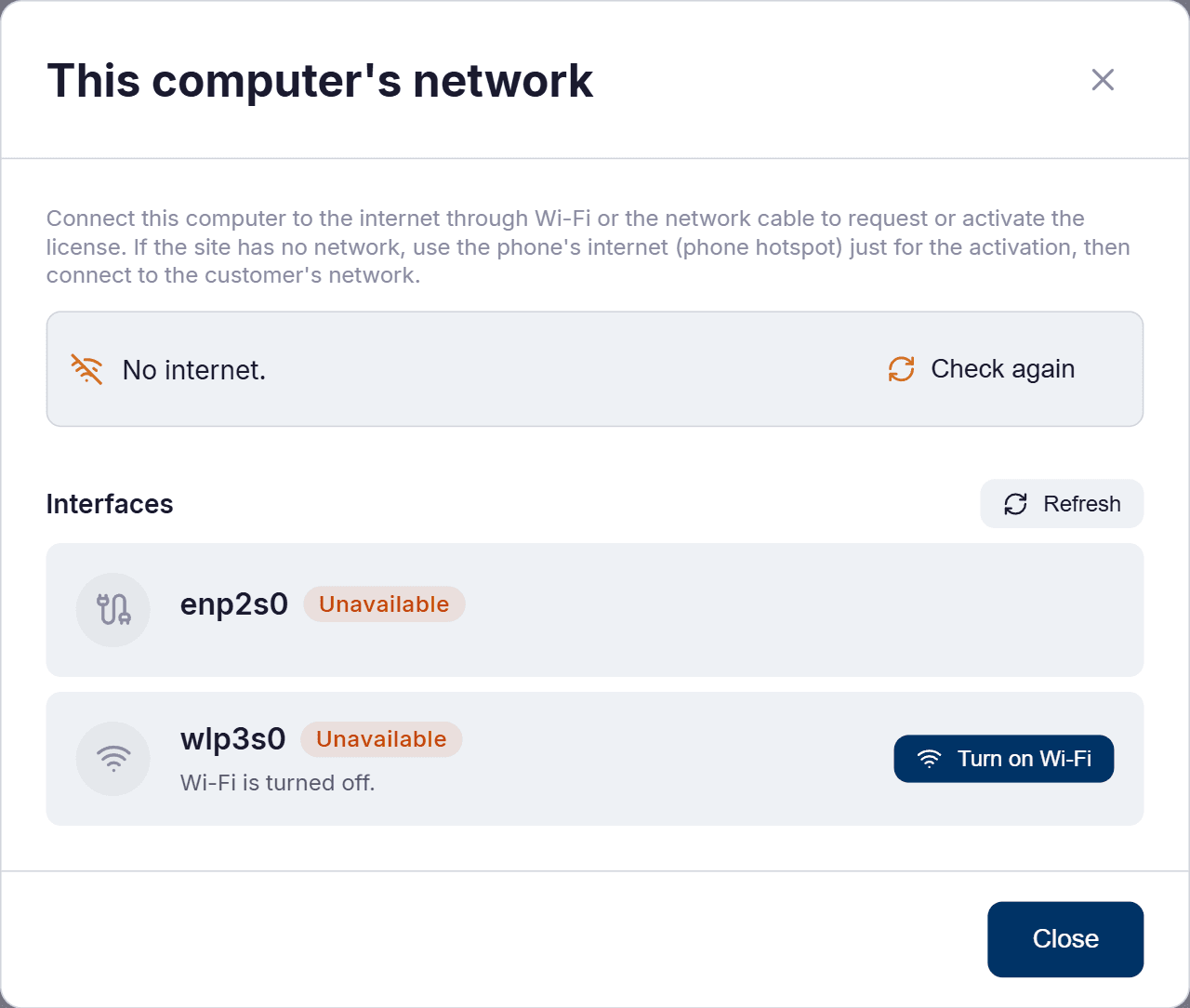
- No network cable where the computer was installed: join the customer's Wi-Fi there. If the Wi-Fi is off, tap Turn on Wi-Fi first (see If the Wi-Fi is turned off)
- No network on site: turn on your phone's hotspot (the phone sharing its internet), join it only for the activation, and connect the computer to the customer's network afterwards.
While GLORY's server does not answer, the activation screen asks again by itself every 15 seconds: after connecting, there is no need to restart the computer.
On Windows, the window says that the network is managed by the operating system: use the Windows network settings.
Step by step, with a picture of each window and what each message means: A new installation without internet
Ask for and activate the license
On the Activate your Smart Safe screen, choose the language with the flags (top right) and tap Get started.
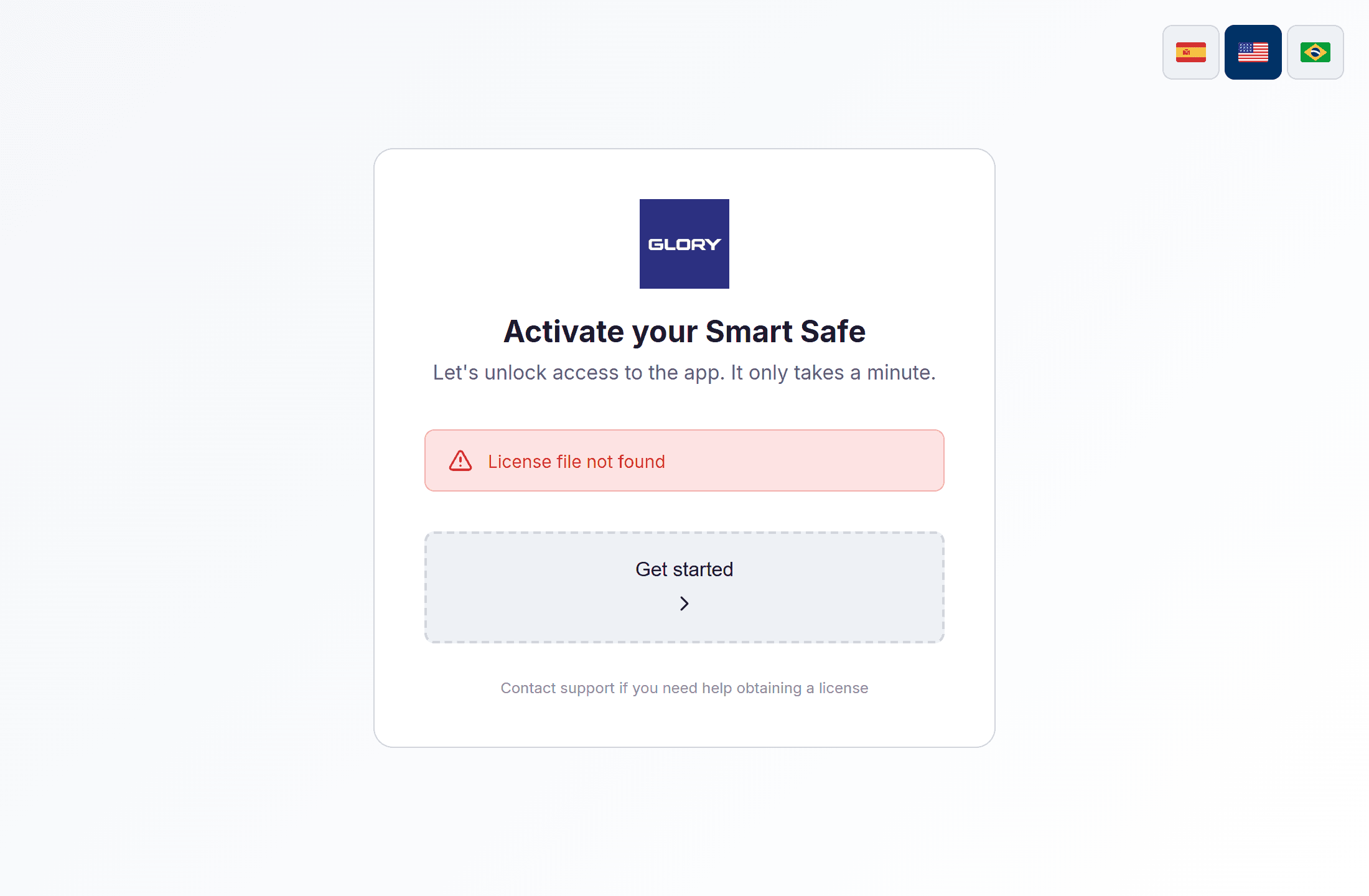
In How would you like to activate?, tap Request a license.
Type your Requester Key and tap Validate Key.
Don't have your key yet, or a portal account? See Your Requester Key
Fill in the form and tap Submit Request:
- Your Name.
- Email Address: it appears by itself; it comes from your key.
- Client Company: choose it from the list. These are your user's organizations on the portal, with the exact name they are registered under at GLORY. If you have only one, it already appears chosen.
Is the customer's company not on the list?
Your user can only ask for licenses for its own organizations. If the customer's is missing, or the Smart Safe Client warns that your user has no organizations yet, open a ticket asking for it to be added to your user: Open a ticket
If a field to type in appears instead of the list
Your Requester Key does not have a portal account yet. Type the company name exactly as it is registered at GLORY: for example, “Company X” may be registered as “Company X S.A.” If the name is not found, the Smart Safe Client warns: “Organization … not found”, or “Ambiguous organization …” with the similar names. Do not guess: if you are not sure, open a ticket and ask how it is registered before sending the request.
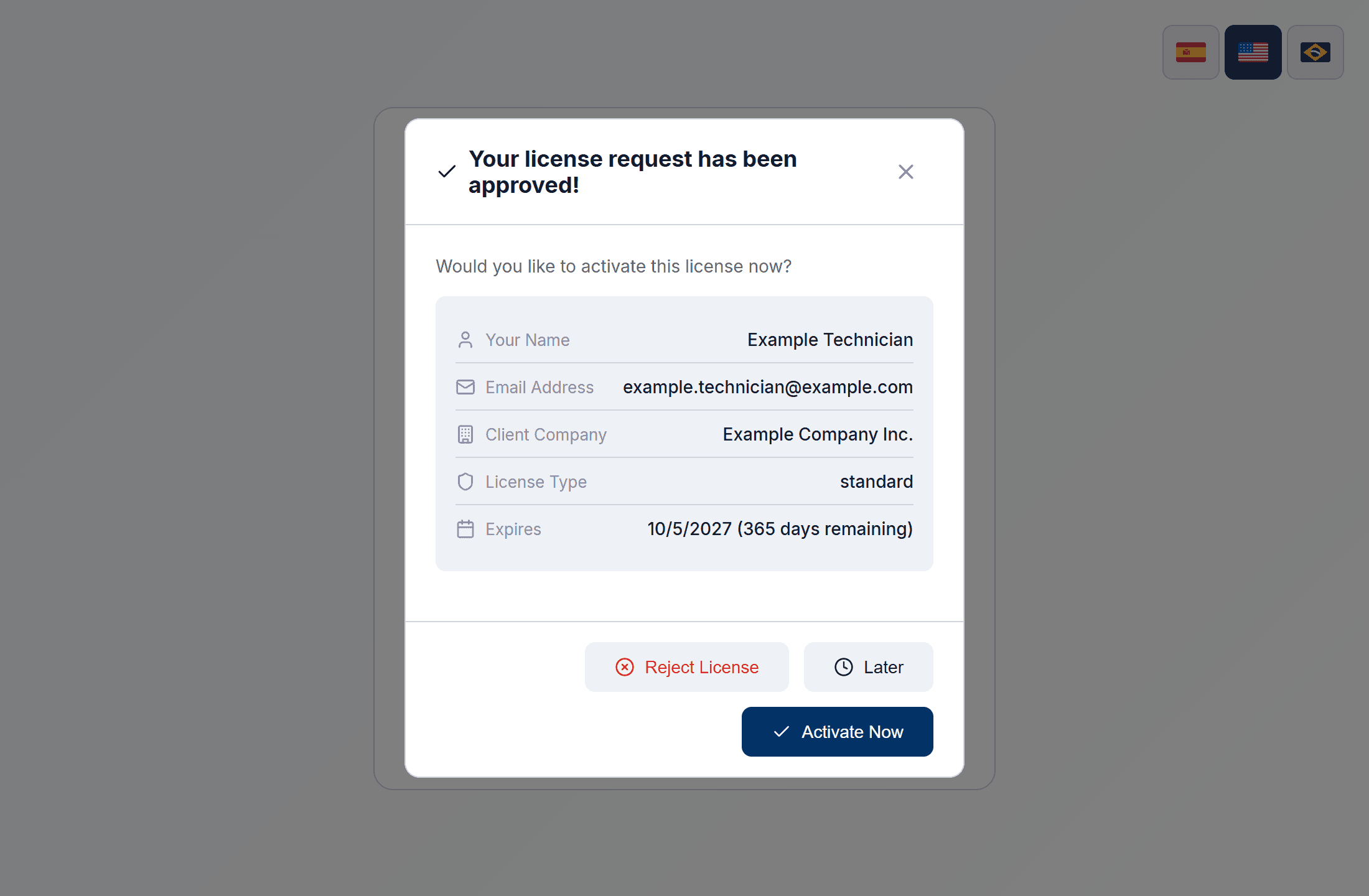
License request pending approval appears. GLORY reviews the request: usually in 1 or 2 business days. When it is approved, an e-mail arrives with the subject Your Smart Safe Client license is ready, in the language of your portal account. It also brings the link to the license on the portal, where its file is downloaded. You can also follow the request on the portal: License requests
Open the Smart Safe Client again, or tap the ↻ button on the pending notice. Your license request has been approved! appears: tap Activate Now.
Sign in with the user glory and the Administrator login code from the Token Generator
The Smart Safe Client does not check by itself
While the request is pending, the Smart Safe Client does not check for the approval on its own. It checks when it opens, or when you tap the ↻ button.
Other ways to activate
In How would you like to activate?, tap I have an activation code, type the code and tap Activate License. You need internet.
The code is the license's Activation ID on the portal, in Licenses
First try the Network button: join a Wi-Fi network, or your phone's hotspot, as Connect the computer to the internet explains. If that is not possible, ask for the license on the portal and take it to the computer in a file:
- On the activation screen, copy the Device code with the Copy button and take it to a computer or phone with internet (for example, paste it into a text file on a USB drive). It is 44 letters, numbers and symbols: the whole code must get there.
- Open Ask for a license on the portal and choose A computer without internet. Fill in Name, choose the Client Company, paste the Device code and tap Send request.
- When the request is approved, open it in License requests and tap Download license file. Copy the file (it ends in
.lic) to a USB drive. - On the computer, in How would you like to activate?, tap I have a license file or key and choose that file.
Licenses are requested only on the portal. If you do not have a portal account yet, ask for one first, as Your Requester Key explains. If you have one but cannot sign in, see Signing in to the portal
On the Settings › License screen, the Request License Renewal button appears when there are fewer than 30 days left before the license expires.
About 15 days before the license expires, an e-mail reminding you to renew it arrives at the e-mail address of the request (subject Your Smart Safe Client license expires in … days), and a reminder 7 days before. They do not arrive if the license has already been renewed.
On the portal, the page of the license shows its renewal in the last 30 days: Ask for renewal sends a request for the same computer. When it is approved, download the license file on the page of the license and, on the Settings › License screen, tap Renew License to choose it.
If the company has a purchase order that renews its licenses, the page of the license says It will be renewed automatically: the Smart Safe Client gets the new license by itself when the computer has internet, and installs it on the login screen, with nobody signed in. More in Renew before it expires
Common problems
| Message | What to do |
|---|---|
| License not valid for this device | A part of the computer was replaced (motherboard, disk or network card). Ask for a new license. |
| System time manipulation detected | The computer's clock went back in time. Correct the date, the time and the time zone. |
| This license has already been activated on another device | That activation code belongs to another computer. Ask for one for this computer. |
If you are going to prepare several identical computers from the same Debian image, see Cloned image
Next step
With the license active, sign in with the user glory and the Token Generator code, and continue with 5. Configuration