
Receipts
What each receipt shows, the notices printed on some of them, the papers that are not receipts, and how to print one again.
At the end of each operation, the Smart Safe Client prints its receipt on its own, if a printer is set up and Auto-print after transactions is on. With Number of Copies above 1, each receipt prints that many times.
What a receipt shows
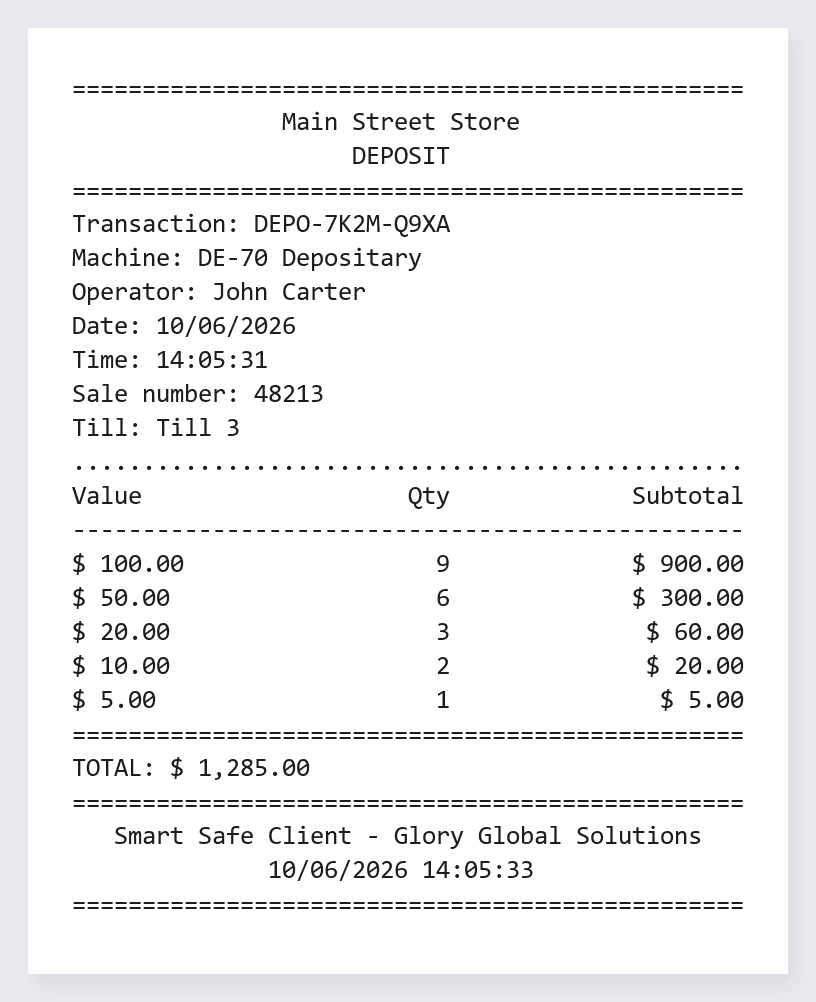
From top to bottom:
| Part | What it shows |
|---|---|
| Header | The Store Name set in General (or Smart Safe Client), and the operation, in capitals: DEPOSIT, COLLECTION… The logo, if Print Logo is on. |
| Transaction | The operation's reference: four letters for the kind of operation, then two groups of four characters, for example DEPO-7K2M-Q9XA. With it, the operation is found in Reports |
| Machine, Operator, Account | The device, the person who signed in, and the account (if the safe has accounts). |
| Date, Time | When the operation happened, in the time of the account's country. |
| Identifications | One line per field filled in before the operation, if there are identifications |
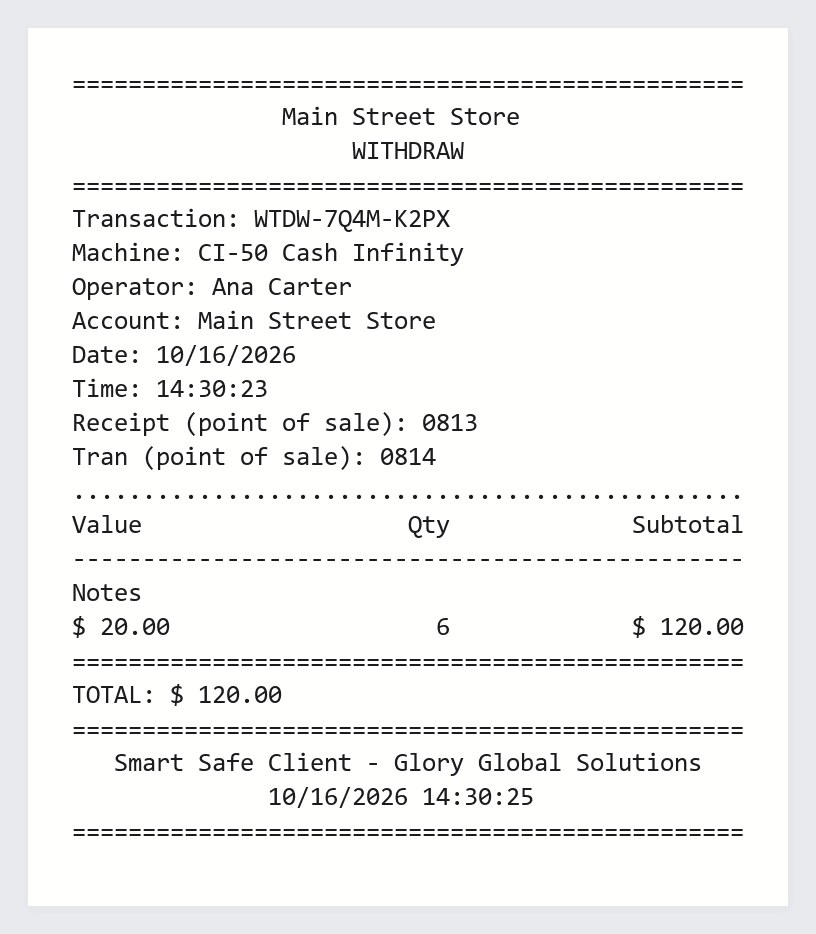
| Point of sale's numbers | On a withdrawal or a payment whose amount was read from the point of sale with its transaction numbers, one line per number, marked as the POS's: Receipt (point of sale): 0813, Tran (point of sale): 0814. With them, the receipt is matched with the POS's own receipt. |
| Value, Qty, Subtotal | Each note (and coin) by value. On a device that takes coins, Notes and Coins are always separate. |
| TOTAL | The amount of the operation. |
| Footer | "Smart Safe Client - Glory Global Solutions" and the time the paper was printed. |
The reference starts with the kind of operation:
| Starts with | Operation |
|---|---|
DEPO | Deposit |
MDEP | Manual deposit |
COLL | Collection |
WTDW | Withdrawal (Cash Infinity) |
PAYM | Payment (Cash Infinity) |
CHNG | Change (Cash Infinity) |
REPL | Replenishment (Cash Infinity) |
TRNF | Transfer (Cash Infinity) |
EMPT | Emptying (Cash Infinity) |
IADJ | Inventory adjustment |
RADJ | Reconciliation adjustment |
The receipts, operation by operation
| Receipt | What is special about it |
|---|---|
| DEPOSIT | The notes stored. If the device stored a different amount than it counted, the receipt shows Confirmed (safe) and the Discrepancy. |
| MANUAL DEPOSIT | The amount declared, or the notes declared by value. It is the operator's declaration: the device did not count it. |
| COLLECTION | The notes from the safe (Automatic), the envelopes (Manual) and the TOTAL per currency. With accounts, BY ACCOUNT shows how much belongs to each one, and SAFE DIFFERENCE any difference between the money and the accounts. It has no account line: a collection takes everyone's money. |
| WITHDRAW | The notes and coins paid out. If the device could not pay everything, the receipt says how much is still owed. |
| PAYMENT | What was owed, what came in, the change returned, and what the safe kept. |
| EXCHANGE | What came in and what was paid back, piece by piece. |
| REPLENISHMENT, TRANSFER, EMPTYING | What moved, piece by piece. |
| INVENTORY ADJUSTMENT | A correction of the count after a reconciliation: the decision and who authorised it. It says, in capitals, that it is an internal record. |
Notices printed on some receipts
| Notice | When |
|---|---|
| *** REPRINT *** | A copy printed later from the Reports screen. It is the same operation, not a second one. |
| *** FIRST RECEIPT *** | The receipt of an operation that had no receipt at the time (the device failed), printed by the reconciliation |
| *** CLOSING RECEIPT *** | The receipt of an operation closed in the reconciliation at the amount the device measured. |
Papers that are not receipts
The INCIDENT NOTICE is not a receipt
On the Cash Infinity, when the device stops in the middle of paying out and cannot say what came out, the Smart Safe Client prints an INCIDENT NOTICE: what was asked, and in capitals "DO NOT LEAVE WITH THIS PAPER ALONE — IT IS NOT A RECEIPT". It has no amount, because nothing is confirmed. The person in charge checks the device, and the real receipt prints after the reconciliation
- NOTE COUNT: the slip of a note counting on the DE-70. It says that no money was deposited.
- The inventory and the reports can also be printed, from their screens: they have no logo.
Print a receipt again
Open the Reports screen and find the operation (by its reference, for example).
Open the operation's details and tap the printer button (Reprint receipt).
The copy comes out marked *** REPRINT ***, with the original date, time and operator. It needs the Reprint receipt permission (in a new installation: Administrator, Manager and Technician).