
8. Reports
Every operation recorded by the Smart Safe Client, with filters, totals, the details of each one, and how to save or print them.
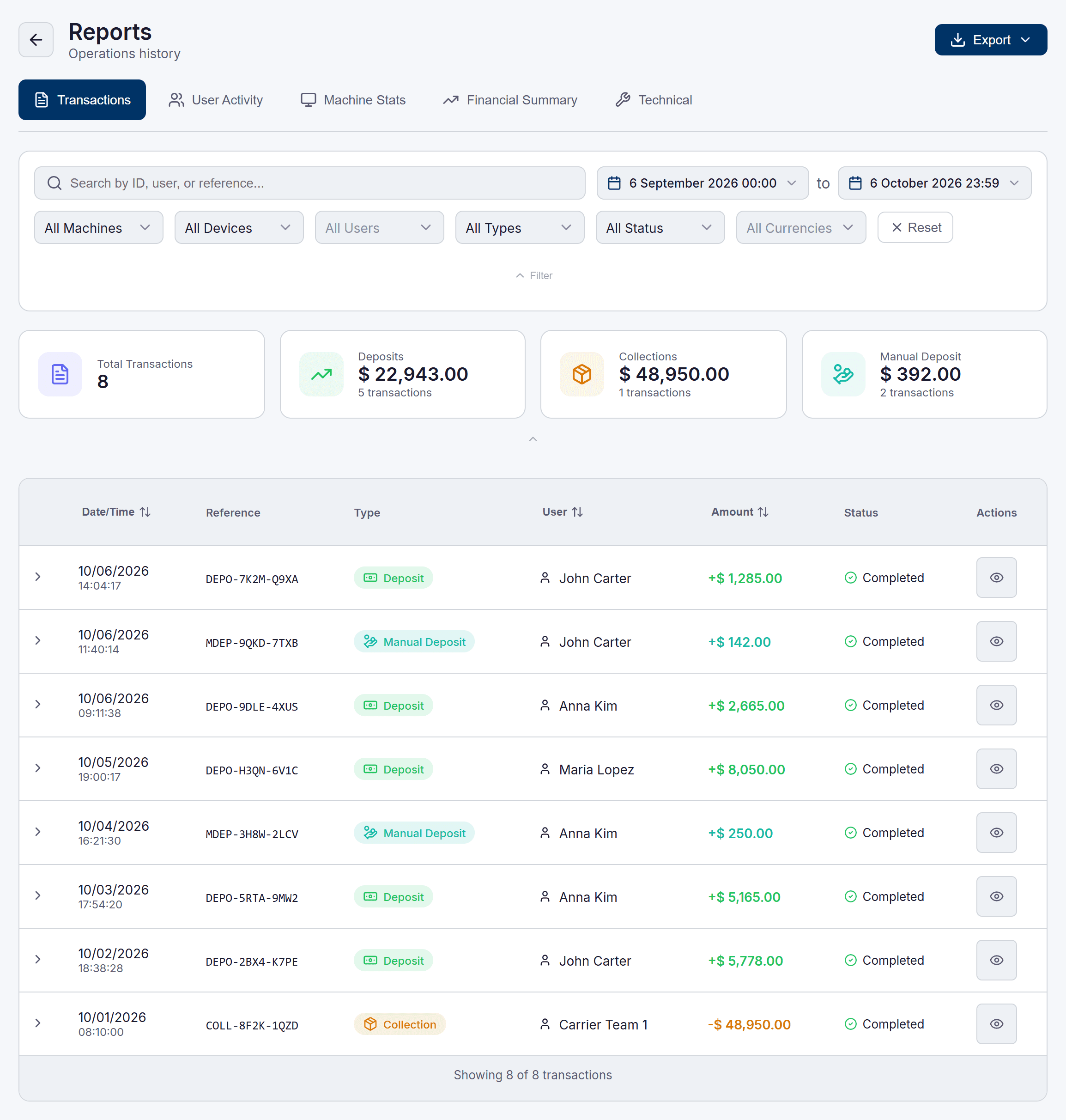
The Reports screen shows every operation the Smart Safe Client recorded: deposits, collections, withdrawals and the others, with their amounts, their notes and coins, who did them and when. Nothing is ever deleted from it.
Open it with the Reports button on the home screen. In a new installation, the Administrator, the Manager, the Technician and the Collection (Carrier) profile see it. Each profile sees only the report types it is allowed to.
The tabs
| Tab | What it shows |
|---|---|
| Transactions | Every operation, one per line, with its details. See Transactions |
| User Activity | What each person did: how many operations and how much money. |
| Machine Stats | Each device: operations, amounts, average time, errors. |
| Financial Summary | The money that came in and went out, by day of the week and by currency. |
| Technical | The events the devices reported, for the technician and support. |
The last four are explained in Statistics
Only your own operations
Without the See every user's transactions permission, a person sees only the operations they did. In a new installation, the Operator does not open Reports, and the Collection (Carrier) profile sees only its own.
Filters
Tap Filter to open them. Every tab, the totals, the export and the printout use the same filters.
| Filter | What it does |
|---|---|
| Search | Finds an operation by its reference (for example DEPO-7K2M-Q9XA), by the person or by part of them. It also finds a withdrawal or a payment by one of the point of sale's transaction numbers: type the whole number, with or without the zeros in front (814 and 0814 find Tran 0814, but 81 does not). |
| Dates | From a day and time to another. It starts with the last 30 days. |
| Accounts | One account, or all. Appears only for those who see every account. |
| Machines, Devices, Models | The kind of device, one device, or one model. |
| Users | One or more people. |
| Types | One kind of operation: Deposit, Collection, Withdrawal… Only the kinds that exist in the period appear. |
| Status | Completed, Pending, Failed or Cancelled. |
| Currencies | One or more currencies. |
| Ended early | Only the operations a sensor or the shutter ended before the operator did (the money counted was kept). Appears only when there are some. |
Reset clears every filter and goes back to the last 30 days.
Up to 1,000 operations at a time
If the filters find more than 1,000 operations, only the first 1,000 are shown, and a notice says so. Narrow the dates or add a filter.
The totals
Above the list, the summary cards (tap the arrow to open them) show the Total Transactions and, for each kind of operation that exists in the period, how many and how much, per currency: Deposits, Withdrawals, Collections, Manual Deposit and the others.
Save and print
Export, at the top, offers:
- CSV: a spreadsheet file. It opens in Excel with the accents right.
- JSON: the same data, for systems.
- Print: a summary on the receipt printer, with the period and the filters used, one line per operation (up to 100).
The file is named after the tab and the moment, for example report_transactions_2026-10-06_14-30-00.csv. Choose where to save it.
The CSV of Transactions has: Date, Time, Reference, Type, Machine, User, Account (with accounts), Amount, Status, Duration and the notes and coins of each operation.