
An error in the middle of an operation
What the INCIDENT NOTICE means, what happens to the customer's money, and how to close an interrupted operation correctly, step by step.
When a device stops in the middle of an operation, the Smart Safe Client never guesses how much money moved. It keeps the operation open, holds the device, and waits for a person to check it. Then the device itself measures what really happened, and the operation is closed at that figure. This page shows how to do it correctly. Three rules, before anything else:
- Do not turn off the machine or the computer, and do not take money out of the machine by hand, except what is at the outlet and what the machine's own guide asks you to take out.
- Keep every paper that printed, and note the operation's reference (for example
WTDW-7K2M-Q9XA): it is on the paper, on the Transaction line. - Do not repeat the operation before the device is checked: the money would be counted, or paid, twice.
The INCIDENT NOTICE
The INCIDENT NOTICE is a paper the Cash Infinity's operations print when the machine stops on a fault, or stops answering, in the middle of moving money, and cannot say how much moved. It is not a receipt: it has no amount, because nothing on it is confirmed ("NO AMOUNT ON THIS NOTICE IS CONFIRMED"). It shows the reference, what was asked, and what to do next. The real receipt prints later, once the machine has been reset and checked, with the figures the machine measured.
An example, from a withdrawal:
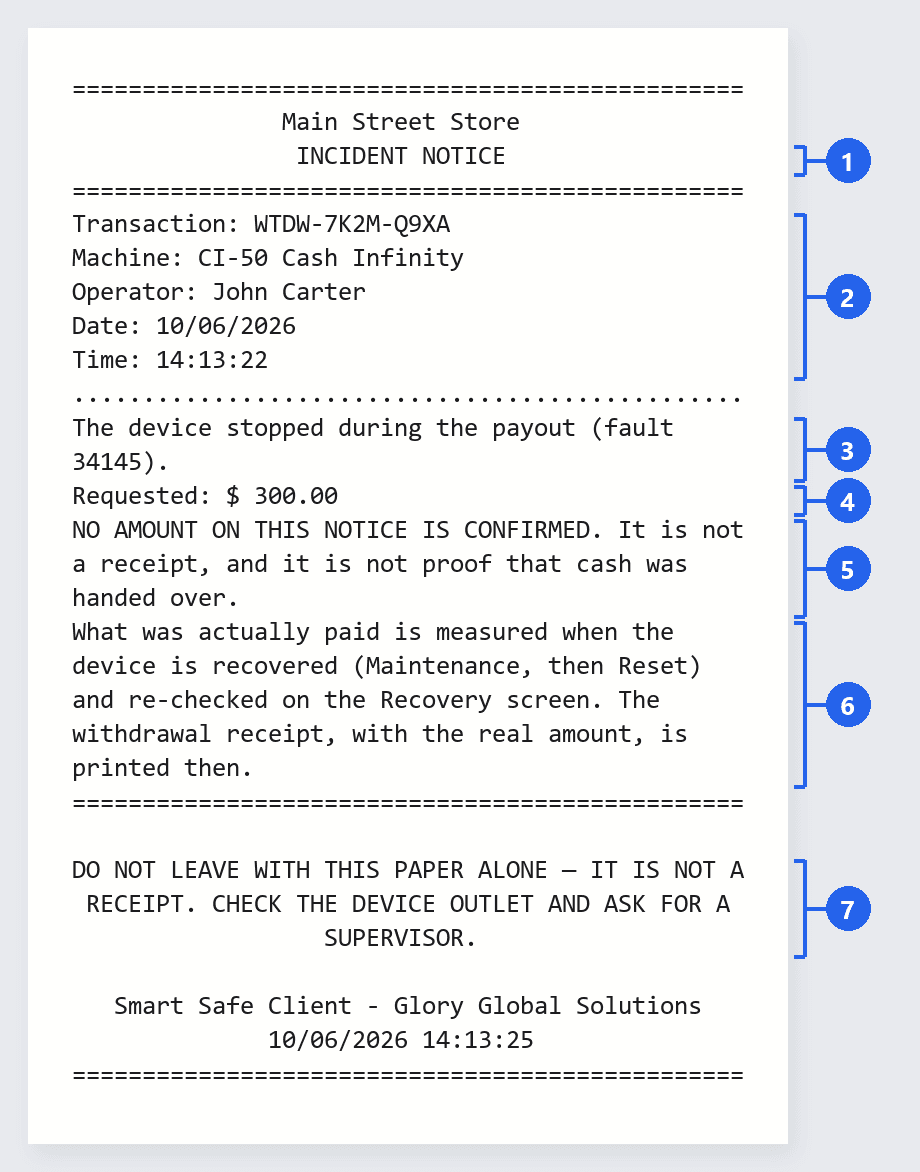
| On the paper | What it means | |
|---|---|---|
| 1 | INCIDENT NOTICE | The paper's name. It is not a receipt. |
| 2 | Transaction, Machine, Operator, Date, Time | The operation's reference (here WTDW-7K2M-Q9XA), the machine, who ran the operation, and when. Note the reference: it finds the operation on the Reports screen, and it goes in the ticket. |
| 3 | "The device stopped during the payout (fault 34145)." | What happened, with the machine's fault code. The same code is under Last error reported by the device, on the Maintenance screen. |
| 4 | Requested | What was asked for, not what was paid. When the notes and coins were chosen one by one, a Pieces requested line lists them. |
| 5 | "NO AMOUNT ON THIS NOTICE IS CONFIRMED…" | Nothing on this paper proves that money was handed over. |
| 6 | "What was actually paid is measured when…" | What comes next: the machine is reset on the Maintenance screen and checked on the Reconciliation Required screen, which the paper calls "the Recovery screen". Then the real receipt prints, with the amount the machine measured. |
| 7 | "DO NOT LEAVE WITH THIS PAPER ALONE…" | The customer must not leave with only this paper: check the outlet and call a supervisor. |
The other operations print the same parts. Parts 3, 4 and 7 change with the operation: see the table under the flow chart.
What to do with it, from the paper to the closed operation:
The INCIDENT NOTICE printed
The Cash Infinity stopped while moving money. The paper is not a receipt: it has no confirmed amount.
1.Take any money from the outlet, keep the papers
Note the reference on the Transaction line and call a supervisor. Do not repeat the operation.
2.Can you open the Maintenance screen?
Home › Maintenance
It needs the Maintenance permission.
No, it is not allowedCall someone with the Maintenance permission
In a new installation: Administrator, Manager or Technician. Then go back to step 2.
3.Read the machine’s last error
Maintenance › Last error reported by the device
The machine’s code and its picture guide.
4.Follow the machine’s picture guide
Release upper unit, if the guide asks
Open the part it shows and take out the stuck notes or coins.
5.Reset the machine and wait
Reset device
Some resets take minutes. Keep the screen open.
6.Does it say “Recovery complete”?
Recovery failedStill resetting after 4 minutesClose any open unit, take out what is stuck
The screen warns that the machine may be waiting for something to be done to it. Keep the screen open: the reset of step 5 goes on.
7.Open the Reconciliation Required screen
Home › Needs reconciliation
It reads the machine and settles what it can by itself.
8.Does it say “Nothing to reconcile”?
The device is balanced and back in service.
A pending item is listedFind the cause of the difference
The device counts its own money (Measured): no counting by hand. Look at its last operations on the Reports screen and, if possible, check with the technician who recovered it what happened.
Close the pending item
Close the pending item
Needs the Reconcile held devices permission. Then go back to step 8.
A difference you cannot explain? Open a ticket
Operations could not be finishedReset the machine again
Go to Maintenance › Reset device
Check the device again
Re-check the device
Then go back to step 8.
Still holding an operationReset the machine again
Go back to step 5.
No connection to the deviceCheck the power and the connection to the device
Check the device again
Re-check the device
Then go back to step 8.
Counted cash is inside the deviceRelease the counted cash
Release the machine
Then go back to step 8.
9.Give the customer the real receipt
It says *** FIRST RECEIPT *** (or *** CLOSING RECEIPT ***). Not printed? Print it again from the Reports screen.
10.Is a debt shown on the home screen?
Pending payout, Change owed or Exchange owed.
YesThe person who ran the operation signs in
Only that person sees the debt.
Pay the debt
Pay now
No money in the machine? Deposit or replenish first.
Closed
The machine is back in service, and the Reports screen shows how the operation was closed.
It prints in these operations, always on the Cash Infinity (the DE-70 never prints it):
| Operation | When it prints | What the notice tells the counter |
|---|---|---|
| Withdraw, and the payment of a debt (Pending payout, Change owed, Exchange owed) | The machine stopped while paying out and cannot say what came out. | What was requested (and the pieces, if they were chosen), and "DO NOT LEAVE WITH THIS PAPER ALONE — IT IS NOT A RECEIPT. CHECK THE DEVICE OUTLET AND ASK FOR A SUPERVISOR." |
| Payment | The machine stopped with the payment open and cannot say what it took, or the operator tapped Stop and call for help. | The Amount owed, what was "Counted in when it stopped (not confirmed)", and "DO NOT LEAVE WITH THIS PAPER ALONE — IT IS NOT A RECEIPT. ASK FOR A SUPERVISOR." |
| Change | The machine stopped during the exchange, or would not hand the money back after Give up. | What was "Taken in (not confirmed)", and the same request to ask for a supervisor. |
| Transfer | The machine stopped during the transfer and cannot say what moved. | What was requested, and "KEEP EVERYTHING TAKEN OUT OF THE MACHINE WITH THIS NOTICE — IT IS RECORDED AS MONEY OUT." |
| Emptying | The machine stopped during the emptying and cannot say what left. | What was requested, and "KEEP EVERYTHING THAT CAME OUT OF THE OUTLET OR WAS TAKEN OUT OF THE MACHINE WITH THIS NOTICE — IT IS RECORDED AS MONEY OUT." |
| Collection of the note cassette or the coin box | The machine stopped during the swap and cannot say what left. | What was in the container at the start, and "KEEP THIS NOTICE WITH WHATEVER WAS TAKEN OUT OF THE MACHINE." |
What it means for the money:
- Nothing is decided yet. The operation stays open and the machine is held. Once the machine is reset, it measures what really left or entered, and the operation is recorded at that figure. Nothing is ever paid twice: the Smart Safe Client never sends the payout again.
- If there is money in the outlet, it has already left the machine. Take it: in a withdrawal or a payment it is the customer's; in a transfer, an emptying or a collection, keep it with the notice. The measurement counts it.
- What the machine could not pay is owed. If it paid less than was asked, or kept more than it should (change not handed back, an exchange left halfway), the difference becomes a debt to the person who ran the operation: Pending payout, Change owed or Exchange owed, paid later with Pay now.
Close it, step by step
You need someone with the Maintenance permission (in a new installation: Administrator, Manager and Technician) and someone with the Reconcile held devices permission (Administrator and Manager). It can be the same person.
At the counter. Take whatever is in the outlet: in a withdrawal or a payment it is the customer's; in a transfer, an emptying or a collection, keep it with the notice. Note the reference. Do not let the customer leave with only the notice: call a supervisor, as the paper asks.
Open Maintenance. On the home screen, tap Maintenance. Under Last error reported by the device you see the machine's code and its guide: a picture of what to open and what to take out.
Follow the machine's guide. Open the part it shows and take out the stuck notes or coins. If the guide asks to open the upper unit, tap Release upper unit and confirm. See Upper unit
Tap Reset device and wait. Some resets take minutes: the screen shows "In progress for …". After 4 minutes it warns that the machine "may be waiting for something to be done to it": close any open unit, take out what is stuck, and keep the screen open.
- Recovery complete: go on to the next step.
- Recovery failed ("The equipment could not be recovered." or "The device did not accept the reset — it is still in error, or resetting on its own…"): follow the guide again, check that no unit is open, and tap Reset device again, as many times as needed. If it keeps failing, open a ticket
Open Reconciliation Required. On the home screen, tap Needs reconciliation (trying any operation on the held machine opens it too). The screen reads the machine and settles on its own what it can: it measures what moved, closes the operation at that figure, prints its receipt and raises any debt. When that is enough, it says "Nothing to reconcile — this device is balanced and back in service".
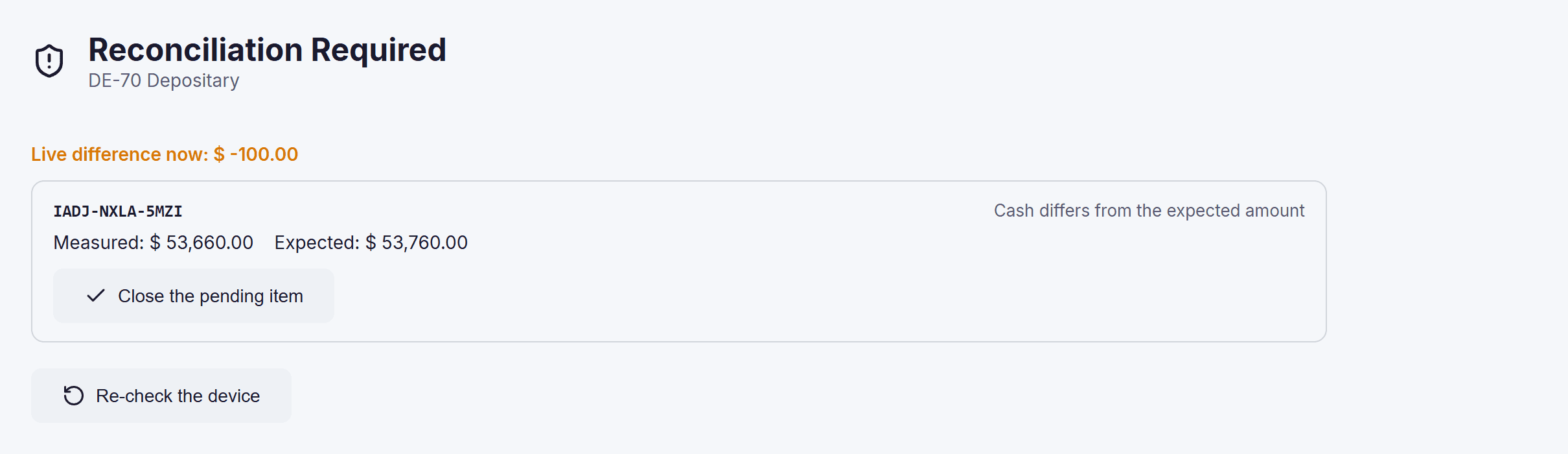
If something is still listed, read it in What Reconciliation Required may say below. For a pending item, find out why it differs and tap Close the pending item. There is no need to count the money by hand: it closes at the amount the machine measured. It only works with the machine ready, and only for someone with the Reconcile held devices permission. What to check for each reason: The reason of a pending item
Give the real receipt to the customer. The operation's receipt prints with what really moved, marked *** FIRST RECEIPT *** when the recovery closed it, or *** CLOSING RECEIPT *** when a person closed it. Keep it with the notice. If it did not print, print it again from the Reports screen, with the reference.
Pay what is owed. If the home screen now shows Pending payout, Change owed or Exchange owed, the person who ran the operation signs in with their own user, taps the sign and taps Pay now. See Money still owed below.
The machine is back in service, and the Reports screen shows how the operation was closed.
What Reconciliation Required may say
Some messages call this screen "the Recovery screen". How it works: Reconciliation
| The screen says | What to do |
|---|---|
| "Nothing to reconcile — this device is balanced and back in service" | Done. |
| "This device is still holding an operation that has not answered, so its contents cannot be measured. Reset it on the maintenance screen first, then come back here." | Go back to the home screen, open the Maintenance screen and tap Reset device. Then tap Needs reconciliation again. |
| "… operation(s) on this equipment could not be finished by the recovery: the equipment did not accept the reset that completes them (still in error, or resetting on its own), or could not be read. The equipment stays held…" | Tap Go to Maintenance, follow the guide and tap Reset device. Come back and tap Re-check the device. |
| "No connection to the device. Reconnect and recover the equipment BEFORE reconciling — reconciliation needs a live reading." | Check the power, the network (Cash Infinity) or the cable (DE-70). Then tap Re-check the device. |
| "The device is not ready (in error, or still working). Recover it first — Reset from Maintenance, or Release here — and refresh; the pending item is closed only with the device ready." | Close the pending item waits until the device is ready. Reset it on the Maintenance screen, come back and tap Re-check the device. |
| "There are notes in the equipment's escrow — a returned batch nobody took out. Go to Maintenance → Reset device and take the notes out when the escrow opens…" (DE-70) | Tap Go to Maintenance, tap Reset device and take the notes out when the escrow opens. |
| A pending item with "Counted cash is inside the device, in a deposit it could not finish — reset the device to confirm it" (or in a replenishment) | The machine still holds money from an operation it could not close. Tap Release the machine: it resets the machine, which decides what went in, and the receipt prints. |
| A pending item with "Counted notes were removed from the escrow and not put back — they never entered the safe" (DE-70) | The DE-70 is owed the notes that were taken out after a jam, and it stays in error until they go back in. Tap Release the machine and, when the escrow opens, put in the amount the screen lists: it enters the safe and is recorded, and the DE-70 is back in service. If those notes cannot be put back, open a ticket with the reference. |
| Machine not released — "The device was reset but reported nothing received. With the device ready, use Close the pending item — it closes at what the device holds." | Tap Close the pending item. |
| Machine not released — "Nothing was put into the escrow, so nothing was stored. The machine is still blocked. Releasing it means putting the amount it is owed into the escrow." (DE-70) | Tap Release the machine again and put the amount into the escrow when it opens. If it cannot be put back, open a ticket with the reference. |
| Machine not released — "The device did not accept the reset — it is still in error, or resetting on its own…" | Follow the device's guide, check that no unit is open, wait until it is at rest, and try again. |
| "This device requires a manager to reconcile it. You do not have permission to resolve these items." | Call someone with the Reconcile held devices permission. |
| "Ask a manager or an administrator to release the device on the Maintenance screen." | Call someone with the Maintenance permission. |
| "… is held in the device's upper unit (…) — pieces a payout could not deliver, pulled back inside when the device was reset…" | Those notes are counted, but not in a recycler. Leave them there: if someone takes them out by hand, the next check reads it as a difference and the machine is held again. |
The reason of a pending item
Each pending item shows its reference and a reason, with Measured (what the device has) and Expected (what the count says). Before you tap Close the pending item, check:
| Reason | What to check before closing |
|---|---|
| "Cash differs from the expected amount" | Money may have gone in or out of the device outside the Smart Safe Client, for example notes taken out by hand while clearing a jam. Look at its last operations on the Reports screen and, if possible, check with the technician who recovered the device what happened, and whether any money was taken out of it during the recovery. |
| "Amount could not be measured — needs review" or "Automatic recovery gave up — needs review" | The device could not be read in time. Reset it, tap Re-check the device, and only then close. |
| "Cash remained after a return — needs review" | More or less money than expected stayed in the device after a deposit was given back. Look at that deposit on the Reports screen and, if possible, check with the operator who made it what happened when it was given back. |
| "Storage confirmation was lost — needs review" or "Counted and measured amounts disagree" | The device's figure and the count differ. Compare Measured and Expected with the operation's receipt and with the operation on the Reports screen. |
| "Collection interrupted after the device was opened — never confirmed" or "Collection amount could not be measured" | Find out whether the money left: look in the safe and, if possible, confirm with the carrier whether the collection was made. |
| "Manual envelope — not counted by the device" | The device never counts an envelope. Check that the envelope is in the safe. |
| "Records are inconsistent — needs review" | Open a ticket before closing it. |
Close the pending item accepts the device's figure as the truth. If the difference cannot be explained, do not close it: open a ticket
The papers that follow
| Paper | What it is |
|---|---|
| The operation's receipt with *** FIRST RECEIPT *** | Printed by the recovery: the operation had no receipt when it happened. It shows what the device measured. |
| The operation's receipt with *** CLOSING RECEIPT *** | Printed when a person closed the pending item, at the amount the device measured. |
| INVENTORY ADJUSTMENT | A correction of the count, with the decision and who authorised it. It is an internal record, not proof that anyone received or handed over money. |
| A receipt with "Settlement of Withdrawal WTDW-…" (or of a payment, or a change) | The payment of a debt, with the reference of the operation that created it. "STILL OWED: …" means part of it is still owed. |
On the Reports screen, the closed operation carries a note such as "Withdrawal interrupted and completed by the device recovery…" or "Pending item closed at the amount the device measured…". See Receipts
Money still owed
| What you see | What to do |
|---|---|
| Pending payout: …, Change owed: … or Exchange owed: … on the home screen | Only the person who ran the operation sees it, signed in with their own user, in the same account. They tap it and tap Pay now. See Pending payouts |
| The machine does not have the money to pay it | Do a deposit or a replenishment, then tap Pay now. More cases: Operations |
| The person who is owed cannot come back, or can no longer sign in | Nobody else can collect the debt. Open a ticket with the reference. |
Other ways an operation can end badly
| What happened | What the Smart Safe Client does, and what you do |
|---|---|
| The power went off, the computer restarted, or the Smart Safe Client stopped during an operation | Turn everything back on and sign in. The Smart Safe Client connects to each device and checks the operations that did not end: it settles the ones it can measure, prints their receipts marked *** FIRST RECEIPT ***, and raises any debt. If a deposit or a replenishment was open on a Cash Infinity, it may reset the machine once on its own to confirm the money counted, so the machine moves for a few seconds. On a DE-70, it may reset the DE-70: if notes are still in the escrow, the escrow opens. Take them out: they were not deposited. If a device cannot be read, it stays held: Needs reconciliation, and the steps above. |
| Someone tries to close the Smart Safe Client | It cannot be closed while someone is signed in: "Please log out before closing the application." Never pull the plug during an operation. If the power is often unstable, a UPS helps: see Peripherals |
| The connection is lost in the middle (cable, network, power of the device) | Reconnect the device. On the DE-70, the deposit shows "The device reported an error (SENSE_FAILED)…" or "The device stopped responding…": tap Reset device. On the Cash Infinity, a payout that loses the machine prints an INCIDENT NOTICE: follow the steps above. |
| A deposit stops on the DE-70 (a jam, for example) | Tap Reset device on the deposit screen and do what it asks: take the notes out, or put them back into the escrow. What reached the safe is recorded and its receipt prints. If the counted notes are not put back, a paper "DEPOSIT WITH A JAM…" prints and the DE-70 is held. See DE-70 |
| A deposit or a replenishment stops on the Cash Infinity | Follow the machine's guide and tap Reset device: the reset confirms the money that entered, and the receipt prints. If the reset fails, a paper "DEPOSIT INTERRUPTED BY A DEVICE ERROR…" (or "REPLENISHMENT INTERRUPTED…") prints: the amount is not final and the machine is held. Reset it on the Maintenance screen, then tap Release the machine on the Reconciliation Required screen. |
| A withdrawal stops, but the machine says what came out | No notice: Device fault during the payout. What came out is recorded, and the rest becomes a Pending payout. Reset the machine on the Maintenance screen. |
| A DE-70 collection is not finished ("Collection not performed", "Collection timed out", "Sensors not responding") | Nothing was recorded and the DE-70 is held, because the safe's content no longer matches. Find out whether the pouch left: look in the safe to see whether the full pouch is still there and, if possible, confirm with the carrier whether the collection was made. Then close the pending item on the Reconciliation Required screen: it closes at the amount the DE-70 measures. |
| A manual deposit is interrupted | It is always checked by a person ("Manual envelope — not counted by the device"): check that the envelope is in the safe before closing it. |
| A sensor or the UPS ends a deposit early | The money already counted stays recorded, and the receipt says "Ended early: …". See Peripherals |
When to open a ticket
Open a ticket when the reset keeps failing, when a difference cannot be explained, when the money in hand does not match the receipt, or when the device stays held after these steps. Put in it:
- The operation's reference (on the notice, on the Transaction line) and the time it happened.
- A photo of the INCIDENT NOTICE and of the screens, with the whole message.
- The code under Last error reported by the device, on the Maintenance screen.
- The logs that come checked in Settings › Support (above all, the Glory Device Connection Logs), plus the Database Logs, from the day before the problem until today.
More about the logs: Which logs to send, and which days
Operations
An operation that does not start, the limits, the identifications, the amounts typed, the money a machine still owes, and the other problems common to both devices.
Printer and receipts
A receipt that does not print, a printer that is not in the list, wrong accents or columns, the paper, the cut and the copies, printing a receipt again, and the printers tested by GLORY.