
Profiles and permissions
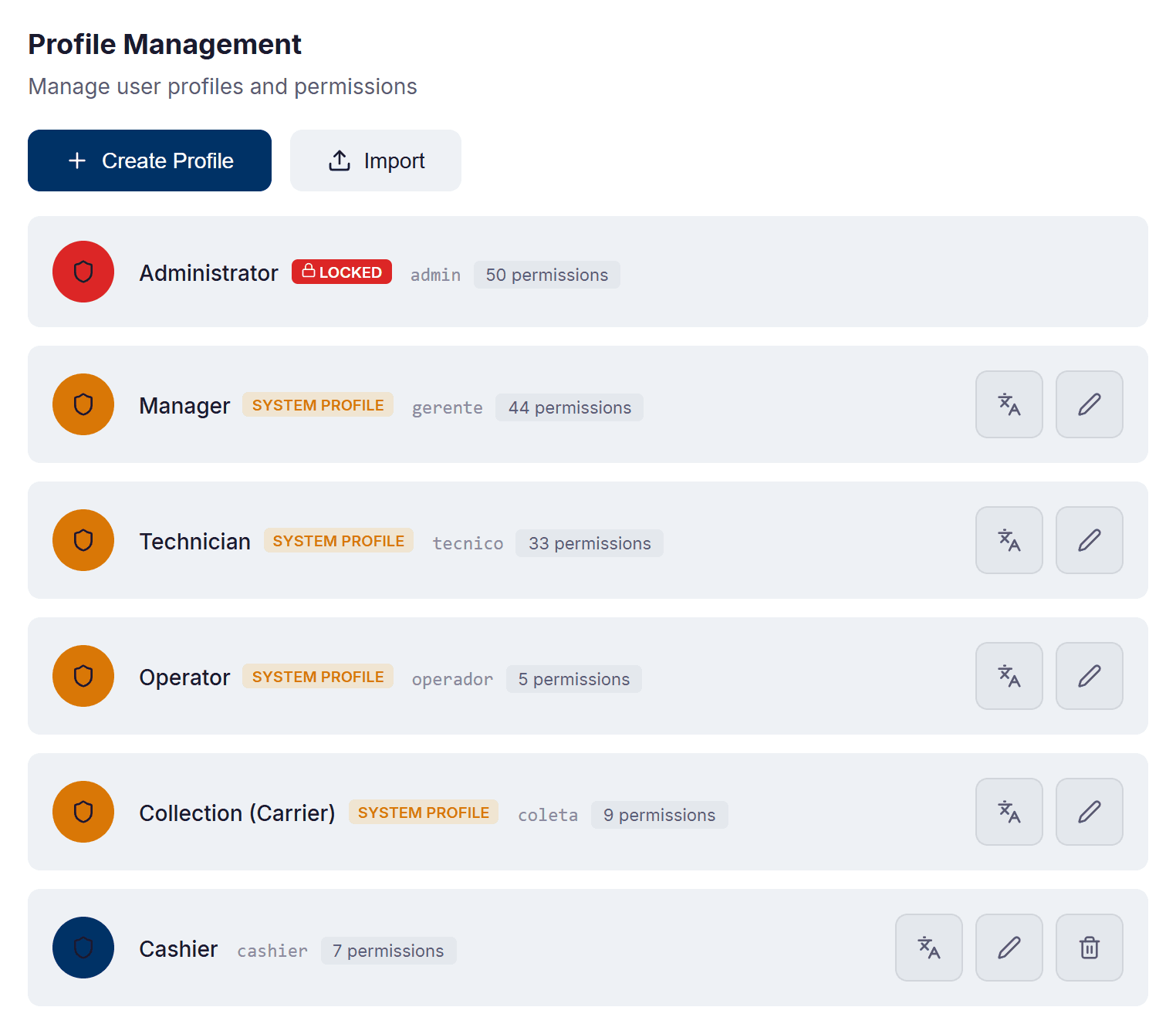
What each profile can do, the five that come with the Smart Safe Client, and how to create your own.
A profile is a set of permissions. Each user has one profile, and the profile decides which operations, reports and settings that person sees. What a profile does not allow does not appear on the screen.
The profiles are in Settings › Profiles. In a new installation, only the Administrator sees this tab.
The five built-in profiles
| Profile | For whom |
|---|---|
| Administrator | Configures everything. It is locked: its permissions cannot be changed. |
| Manager | Runs the business: operations, reports, users and limits. |
| Technician | Installs and maintains: devices, network, printer, support, maintenance. |
| Operator | Does the day's deposits. |
| Collection (Carrier) | The person from the carrier company who does the collection. |
The built-in profiles cannot be deleted. Except the Administrator, their permissions can be changed.
What each one can do in a new installation
Operations (✓ = allowed):
| Operation | Administrator | Manager | Technician | Operator | Collection (Carrier) |
|---|---|---|---|---|---|
| Deposit, Manual Deposit | ✓ | ✓ | ✓ | ✓ | |
| Collection | ✓ | ✓ | ✓ | ✓ | |
| Inventory, Maintenance | ✓ | ✓ | ✓ | ||
| Counting (DE-70) | ✓ | ✓ | ✓ | ||
| Withdraw (Cash Infinity) | ✓ | ✓ | ✓ | ||
| Payment, Change (Cash Infinity) | ✓ | ✓ | |||
| Replenishment, Transfer, Emptying (Cash Infinity) | ✓ | ✓ | ✓ | ||
| Reports | ✓ | ✓ | ✓ | ✓ |
Settings tabs:
| Tab | Administrator | Manager | Technician | Operator | Collection (Carrier) |
|---|---|---|---|---|---|
| General, Network, Devices, Peripherals, Printer, Integrations, Logs, Support | ✓ | ✓ | ✓ | ||
| Version | ✓ | ✓ | ✓ | ✓ | |
| Users, Transactions, Reconcile held devices | ✓ | ✓ | |||
| My password | ✓ | ✓ | ✓ | ✓ | |
| Profiles, License, Accounts, Password policies, Change kits | ✓ |
The Operator does not see the Inventory: it shows everything the safe holds, and when several establishments share the safe, an operator works for only one of them.
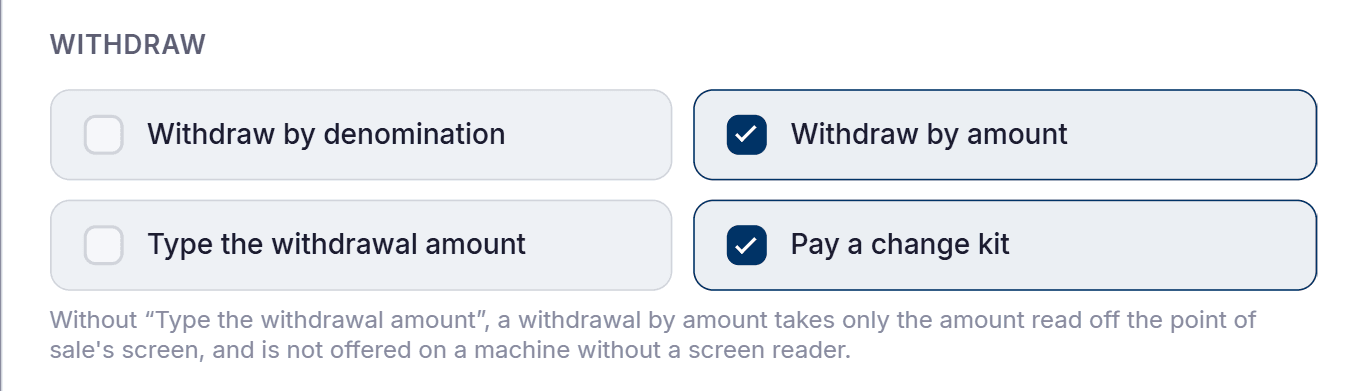
The Operator withdraws only with a change kit or with the amount read from the point of sale: never an amount typed, never notes and coins chosen one by one. See Withdraw only the amount read from the point of sale
Create a profile
Create your own profile when none of the five fits, for example a cashier who deposits and also sees the reports.
Open Settings › Profiles and tap Create Profile.
Type the Display Name. The Internal Name is filled in for you.
Tick what the profile can do (see the groups below). A new profile starts with everything off, except the access to the devices.
Save. The Translate window opens: type the profile's name in each language the operators use, and save.
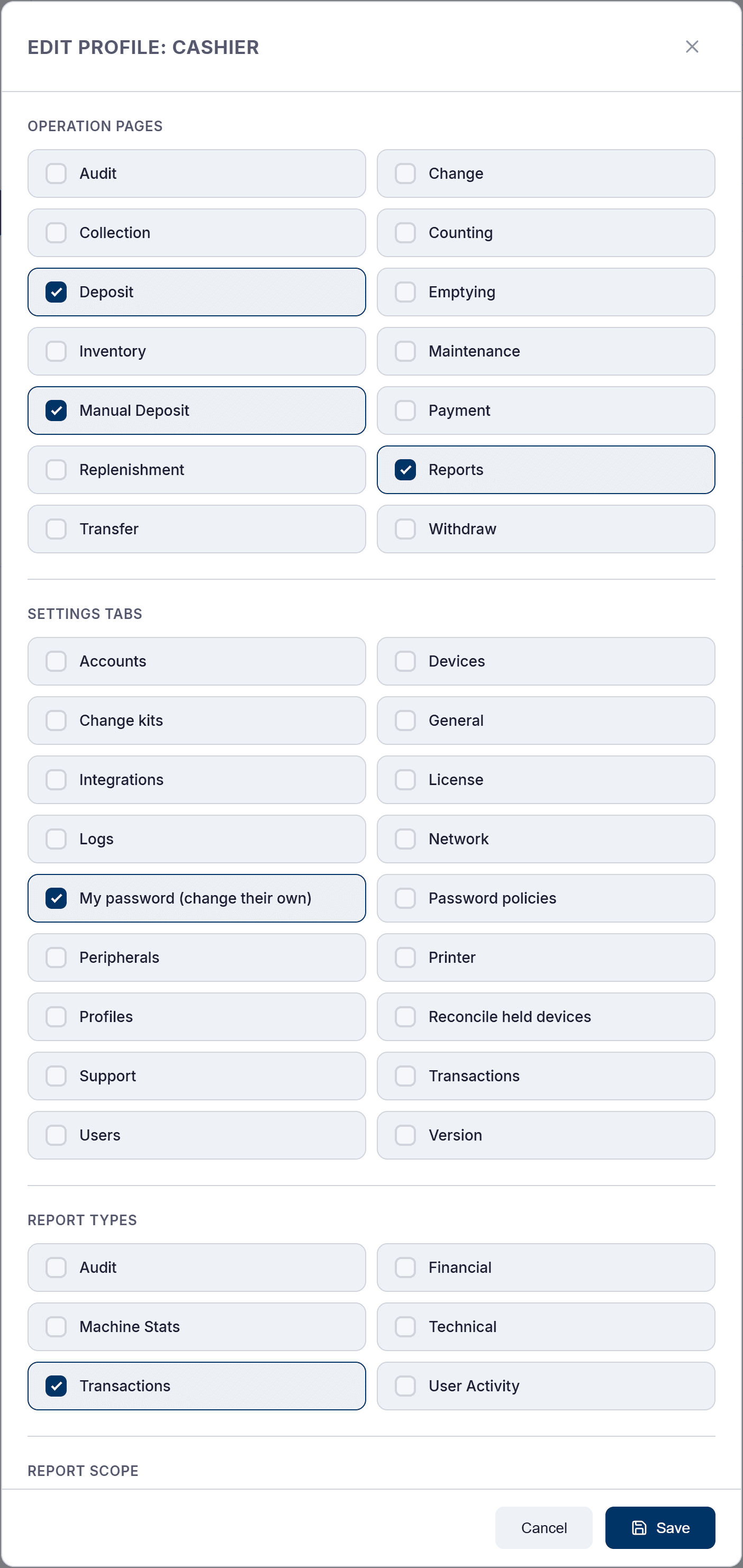
To change a profile, tap its pencil. To delete it, tap its trash icon: a profile that still has users cannot be deleted (move the users to another profile first).
The permissions, group by group
| Group | What it decides |
|---|---|
| Operation Pages | Which buttons appear on the home screen: Deposit, Manual Deposit, Collection, Inventory, Maintenance, Counting, Reports, and on the Cash Infinity Withdraw, Payment, Change, Replenishment, Transfer, Emptying. Audit is not used by the DE-70 or the Cash Infinity. |
| Settings Tabs | Which tabs of the Settings screen appear. Reconcile held devices is not a tab: it allows releasing a device held for reconciliation (see Reconciliation) |
| Report Types | Which reports appear: Transactions, User Activity, Machine Stats, Financial, Technical. The Audit report stays empty with the DE-70 and the Cash Infinity. |
| Report Scope | See every user's transactions: without it, a person sees only their own operations in the reports. Reprint receipt: allows printing a receipt again. |
| Account Scope | See and administer every account: without it, a person sees only the account they signed in to. |
| Withdraw (Cash Infinity) | How the profile may withdraw: Withdraw by amount, Type the withdrawal amount, Withdraw by denomination, Pay a change kit. Without Type the withdrawal amount, the withdrawal by amount only takes the amount read from the point of sale's screen (OCR). |
| Replenishment (Cash Infinity) | Replenish through the entrance and Replenish from the interface cassette. |
| Collection (Cash Infinity) | Which container the profile may collect: Note cassette collection, Coin box collection. |
| Device Access | Which devices the profile may use, one by one. A new device is open to every profile: untick it where it should not be. |
Many profiles at once
Import loads profiles from a spreadsheet (CSV or Excel). See Import and export