
Inventory and maintenance
Seeing what the Cash Infinity holds, compartment by compartment, and keeping it working: its state, the reset and the upper unit.
Inventory
The Inventory screen shows what the Cash Infinity holds right now. It is only for looking: it does not change anything.
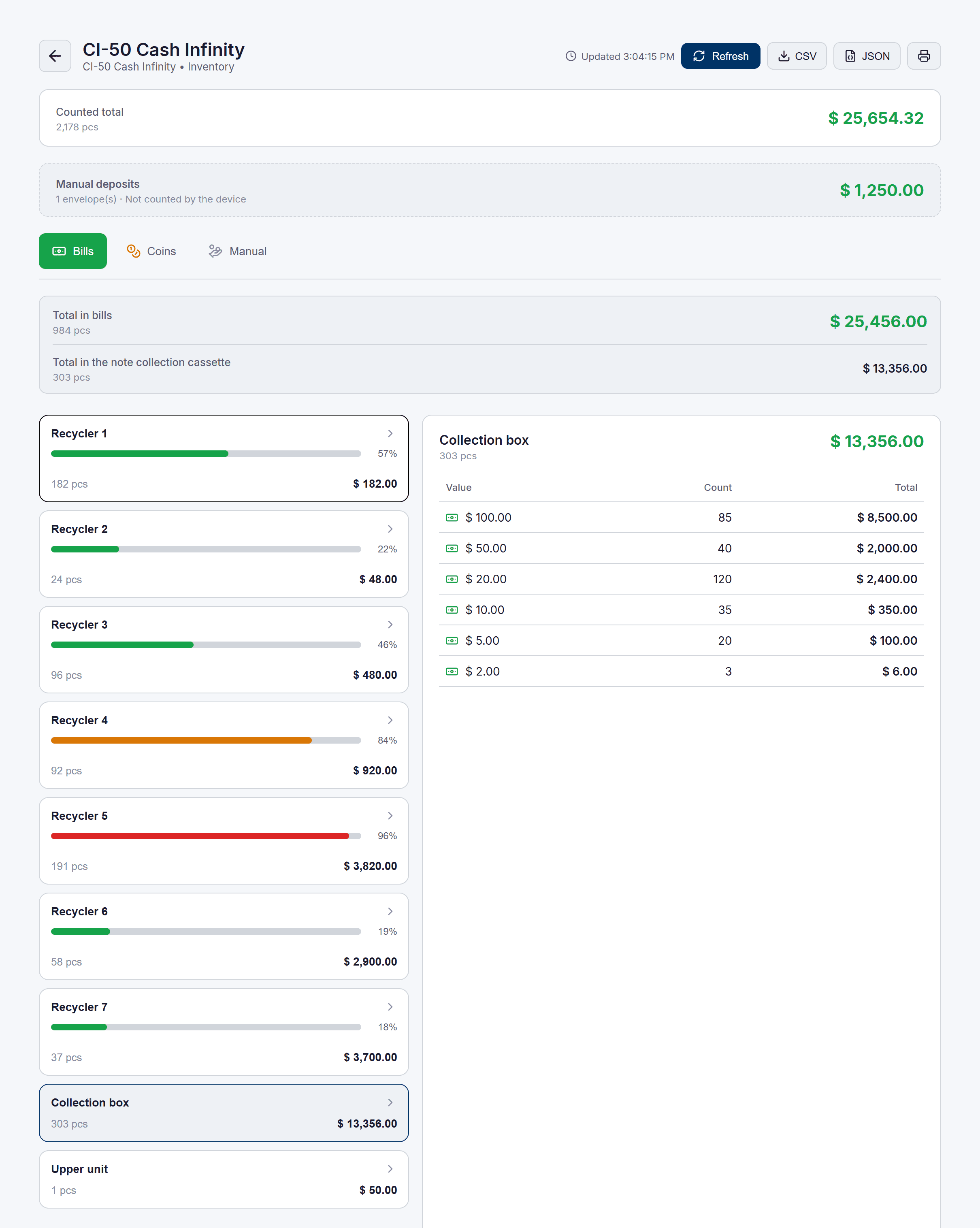
- Counted total: everything the machine holds, with the number of pieces.
- Manual deposits: the envelopes recorded since the last collection, "Not counted by the device".
- The Bills, Coins and Manual tabs list each compartment, with Value, Count and Total:
| Compartment | What it is |
|---|---|
| Recycler 1, Recycler 2… | The recyclers, with a bar showing how full each one is: amber from 80% and red from 95%. A full recycler sends the next pieces of that value to the collection cassette. |
| Collection box | The note cassette (or the coin box): what leaves with the next collection. |
| Collection cassette (I/F) | The interface cassette, on the machines that have one. |
| Upper unit | Notes that got stuck while being paid out and were pulled back in by a reset. They are counted, but are not paid out until a technician opens the unit. |
Below each tab, Total in bills (or Total in coins) and Total in the note collection cassette (or coin).
Refresh reads the machine again. CSV and JSON save the inventory to a file; the printer button prints it.
Maintenance
For the technician and the manager.
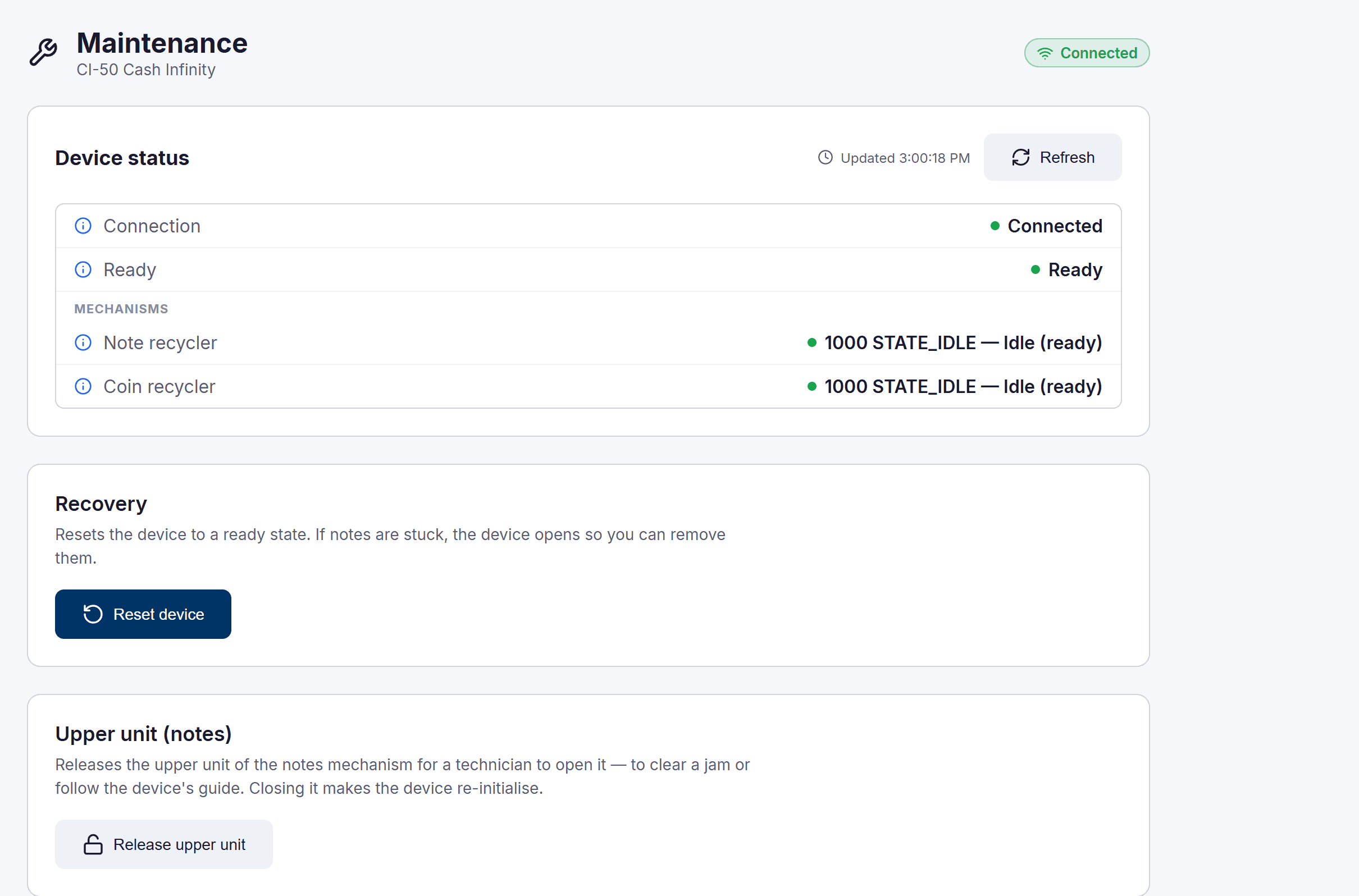
Device status
Connection, Ready, Occupied (another operation is using the machine) and Error, and the state of each mechanism (Note recycler and Coin recycler), for example "1000 STATE_IDLE — Idle (ready)". Refresh reads it again.
Recovery
Reset device puts the machine back in a ready state after an error. Follow the machine's guide first (Last error reported by the device, with the error code and a picture of what to do). Some resets take a few minutes: the screen shows how long it has been running.
After a reset, if an operation was left halfway, the screen says what happened to it, and the device may need the reconciliation
Upper unit (notes)
When a note gets stuck in the notes mechanism, the machine's guide may ask to open its upper unit.
Tap Release upper unit and confirm.
"Upper unit released — open the top of the device". Open it and do what the guide says (take out the stuck note, for example).
Close it. The machine starts again on its own: "Upper unit closed — the device is re-initialising, please wait".
Peripherals
If the safe has peripherals, a Peripherals tab shows their state and tests.
The machine's errors
The Cash Infinity reports its errors by code, with its own guide and pictures: the Smart Safe Client shows them on the operation screen and on the Maintenance screen. The most common messages:
| The screen says | What it means |
|---|---|
| "The machine is in an error state and will not accept commands" | Follow the guide and reset it on the Maintenance screen. |
| "Another operation is running on this machine" | Wait for it to finish. |
| "The session with the machine is no longer valid" | The same user signed in somewhere else. The Smart Safe Client opens the session again in a few seconds: try again, and use a different user in each place. |
| "The machine is not responding" | Check the network and the power. |
| "Cash Infinity runs … older than …" | The controller's firmware is too old. See Minimum version |