
Deposit
Putting money into the Cash Infinity, giving it back, and recording an envelope.
Deposit
The notes and coins go straight into the recyclers as they are counted: there is no escrow, as on the DE-70 (see How the Cash Infinity works)
Tap Deposit and then Start Deposit.
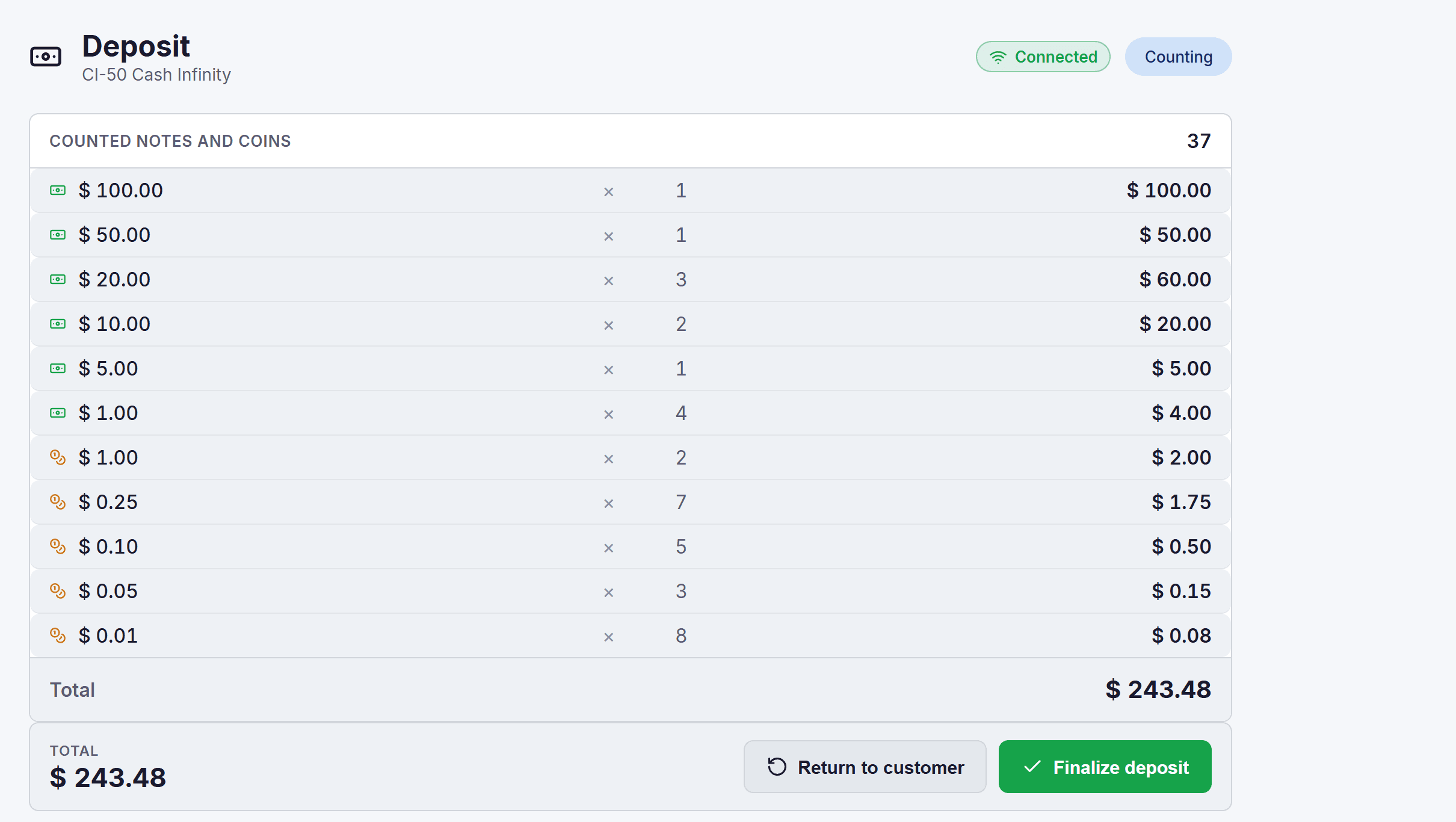
Put the notes and the coins in their entrances. The screen shows each value as it is counted, under Counted notes and coins, with the Total.
When everything is in, tap Finalize deposit. The buttons wait while the machine is still counting.
The receipt prints, separating notes and coins, and the result shows the deposit's reference.
Give the money back
While the deposit is open, Return to customer gives the money back. The machine pays back the same amount from its recyclers, in the notes and coins it has, which may be different from the ones that went in. Take them from the outlet: "Paying back — REMOVE the cash from the outlet".
| What happened | What the Smart Safe Client records |
|---|---|
| Everything was paid back. | No deposit: "Deposit cancelled", with the amount paid back. If it was paid back in other notes or coins, the reports show the deposit as Cancelled, so that the change of pieces is on record. |
| The machine could pay back only part, or nothing (its recyclers did not have enough). | The device could not return the cash: what stayed is a deposit, and its receipt says how much was paid back and how much stayed. |
If the deposit does not start
| The screen says | What to do |
|---|---|
| "This device has reached its … deposit limit" | The machine reached one of its limits for deposits: do a Transfer or a Collection. |
| "Another operation is running on this machine" | Wait for it to finish and try again. |
| "Currency not available for this account" | The machine does not have the currency of the account you signed in to. |
| "The cash in the device doesn't match the expected amount" | The machine is held. See Reconciliation |
If the machine shows an error
The screen shows Device error, with the machine's code and its own guide. Follow the guide and tap Reset device.
- If money had already entered, the reset confirms it: the Smart Safe Client records the deposit with what the machine measured, and prints the receipt.
- If the reset fails with money inside, the deposit stays open and the machine is held. The paper says that the amount is not confirmed yet. See Reconciliation
Manual deposit
The Cash Infinity does not take envelopes. Manual Deposit records an envelope that is kept in the safe by hand: "This machine does not take envelopes: put the sealed envelope in the safe. The amount recorded is the one you declare here".
Tap Manual Deposit.
Write what is in the envelope: By value (the total) or By denomination (how many notes and coins of each value).
Tap Confirm deposit and put the sealed envelope in the safe. The receipt prints.
The amount is the one declared: the machine does not count it. The envelopes are taken out with the next note cassette collection, and the collection receipt lists them.