
Cash Infinity settings
What is specific to the Cash Infinity in the configuration: its users, change kits, the UBIQULAR reference, and where the rest is.
Most of the configuration is the same for every device. This page gathers what is specific to the Cash Infinity.
| What | Where |
|---|---|
| Adding the device: address, Port 80, Event Port 55562 | Devices |
| The secure connection (HTTPS), optional | Secure connection (HTTPS) |
| The client certificate and the encrypted events, optional | Client certificate and Encrypted events |
| The users on the machine, and their passwords | Below and Users |
| Who may withdraw, pay, change, replenish, transfer, empty and collect | Profiles and permissions |
| How much each person may withdraw | Limits |
| Change kits | Below |
| UBIQULAR reference | Below |
| Reading the amount from the point of sale | Peripherals › OCR |
The users on the machine
The Cash Infinity keeps its own users, and records each operation under the person who did it. The Smart Safe Client takes care of them:
- The first time a person signs in to the Smart Safe Client, it creates that person's user on the machine, with the same username and password. If the password is changed later, it updates it on the machine the next time the person signs in.
- To do that, it uses the machine's
gloryuser, which must have one of the passwords recommended by GLORY, or the one typed in Cash Infinity administrator user password in the device settings (see Preparing the Cash Infinity) - Because the username and the password are the same on both, they follow the machine's rules while a Cash Infinity is added: up to 10 characters in the username, 1 to 16 in the password (see Users)
One user, one place
The machine keeps one session per user. If the same user signs in on another computer or another program that uses the same Cash Infinity, the two sessions knock each other out. Give each person, and each program, their own user.
Change kits
A change kit is a set of notes and coins paid out in one tap, for example the change fund of a till at the start of a shift: 20 × 5 and 40 × 1. It is paid on the Withdraw screen, By kit (see Withdrawal)
The kits are in Settings › Transactions › Change kits. In a new installation, only the Administrator sees this tab.
Tap New kit and fill in:
- Name: for example "Till float 1".
- Currency.
- What the kit pays: how many notes and coins of each value. Kit total adds them up.
Choose who may pay it: Profiles allowed to pay it and People allowed to pay it. A kit assigned to nobody appears to nobody.
Leave Kit enabled ticked and tap Create kit.
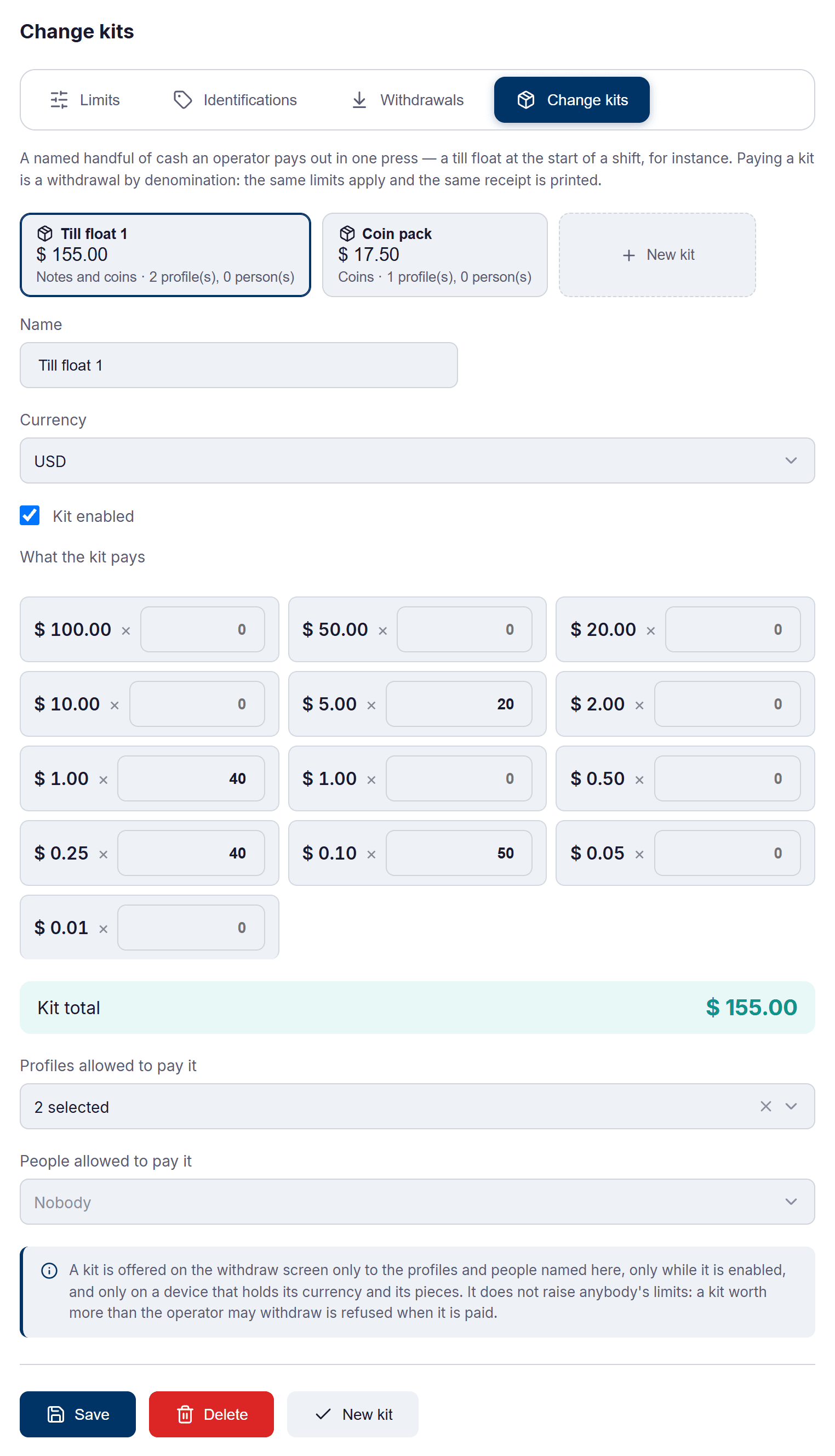
A kit is a withdrawal by denomination: it does not raise anyone's limits, and it only appears on a device that has its currency and its notes and coins.
UBIQULAR reference
UBIQULAR Inform is GLORY's system that reads the Cash Infinity's own records. When a customer uses it, each transaction there must be matched with the operation in the Smart Safe Client. The UBIQULAR reference does that: every Cash Infinity transaction reaches the machine with two codes, which UBIQULAR Inform shows, and which are also printed on the receipt and shown in the operation's details in Reports, to be compared line by line.
- Reference ID (12 characters): that the transaction came from the Smart Safe Client, its kind of operation, when it started, the till and its number.
- Transaction sequence (11 characters): who made it, with the same number.
It is optional, and comes on for every Cash Infinity. Customers who do not use UBIQULAR Inform can leave it as it is or turn it off.
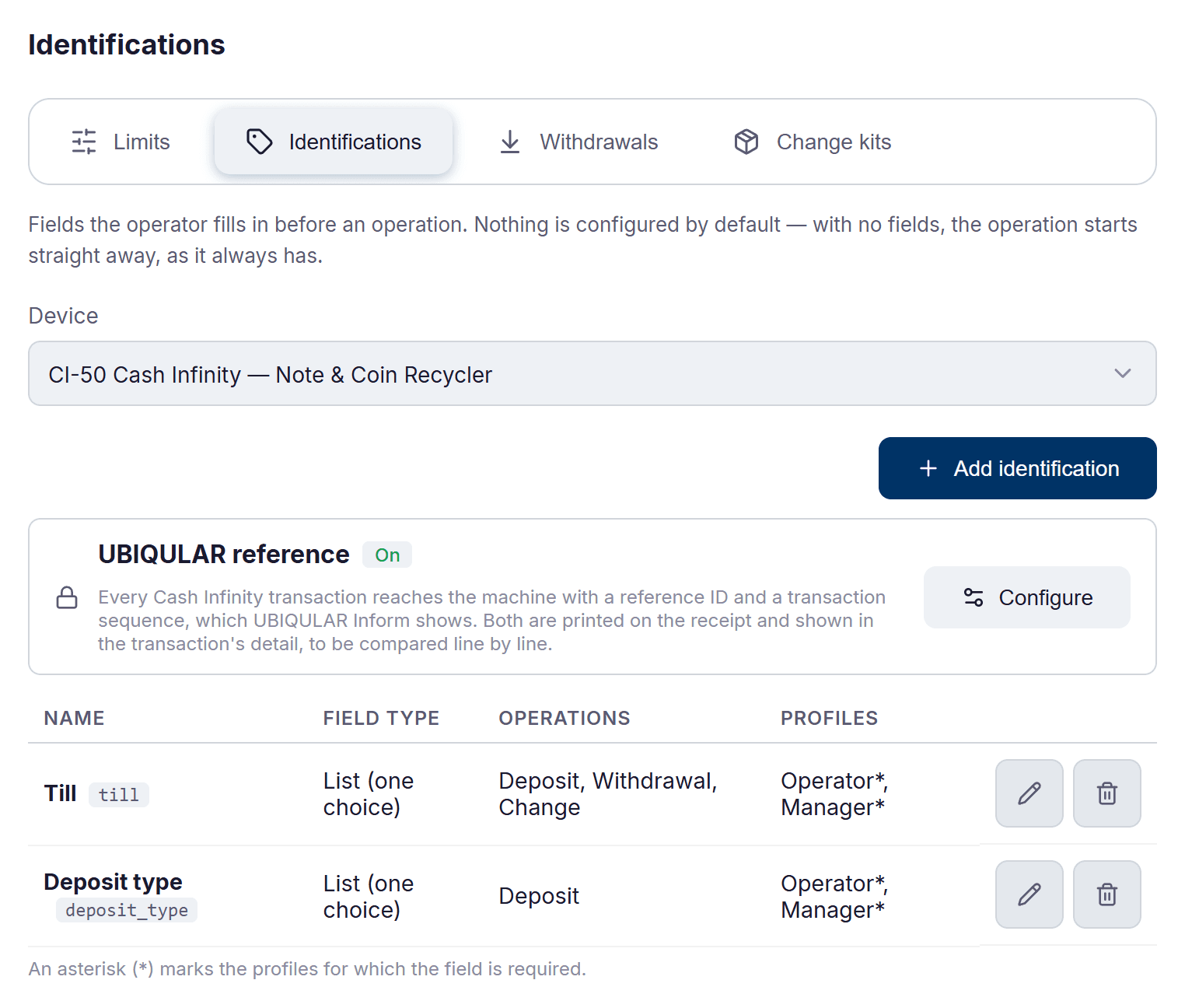
The options are in Settings › Transactions › Identifications, with a Cash Infinity chosen in Device: the UBIQULAR reference card, with On/Off and Configure.
| Option | What it does |
|---|---|
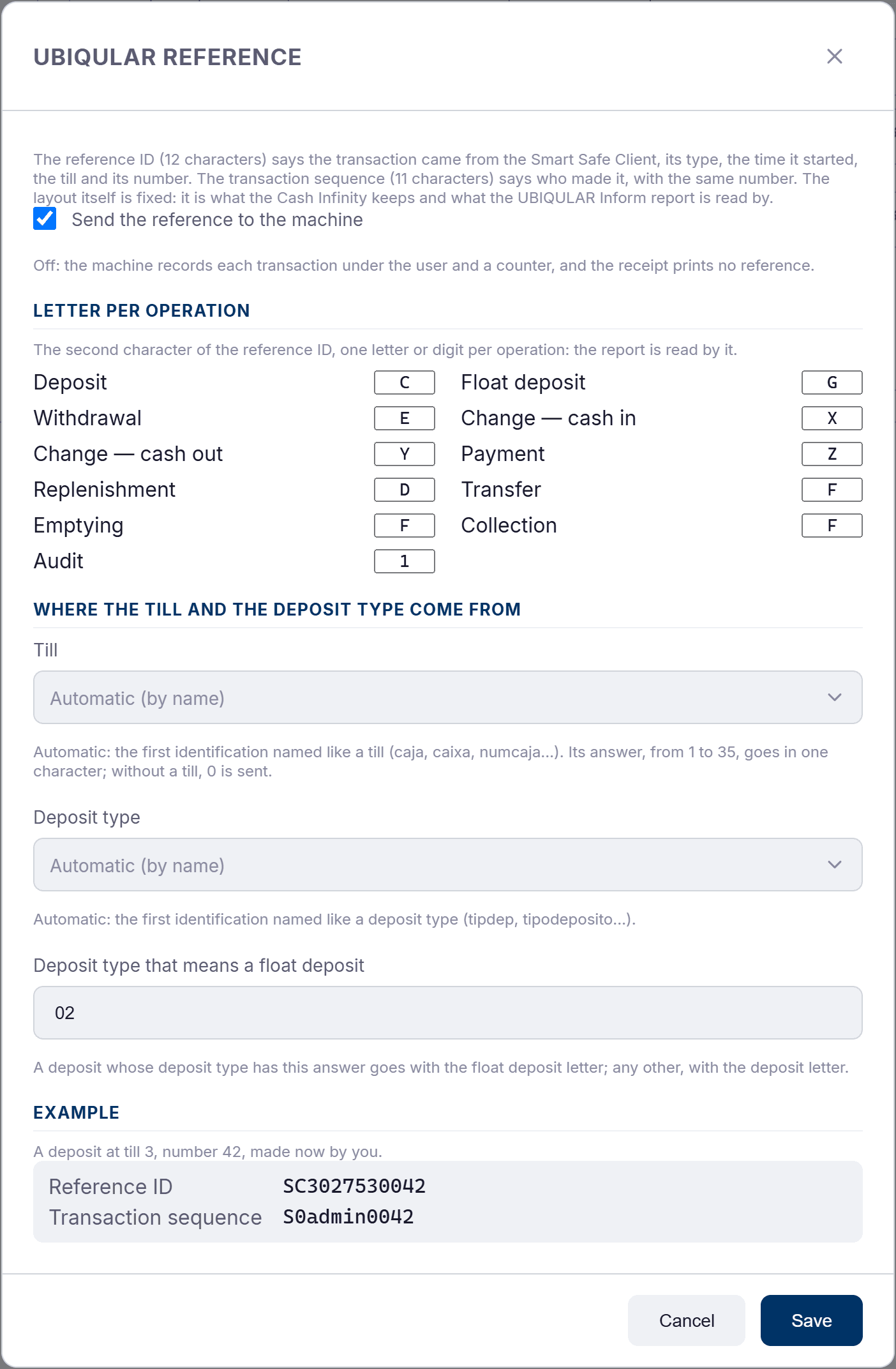
| Send the reference to the machine | On: the codes go to the machine and print on the receipt. Off: the machine records each transaction under the user and a counter, and the receipt prints no reference. |
| Letter per operation | The letter that says the kind of operation in the reference ID, read by the UBIQULAR report. They come as: Deposit C, Float deposit G, Withdrawal E, Change cash in X and cash out Y, Payment Z, Replenishment D, Transfer, Emptying and Collection F. Change them only if the customer's UBIQULAR asks for other letters. |
| Till | Where the till number comes from: Automatic (by name) takes the first identification named like a till. Without a till, 0 is sent. |
| Deposit type and Deposit type that means a float deposit | A deposit whose deposit type has this answer (02, unless changed) is sent with the float deposit letter. |
| Example | Shows the codes of a deposit at till 3, so you can check them before saving. |
With the reference on
The machine's Duplicate transaction check must be Disable (see Preparing the Cash Infinity): some operations, like a change, send two parts with the same sequence.