
Limits
How much a device may hold before it asks for a collection, and how much each person may withdraw.
The limits are in Settings › Transactions: Limits for deposits, Withdrawals for withdrawals. Only profiles with the Transactions permission see this tab (in a new installation, the Administrator and the Manager).
Every limit is a maximum. An empty field, or 0, means no limit.
Deposit limits
A deposit limit says how much a device may hold in total, counting everything inside it since the last collection. It is not a limit per deposit.
When a deposit starts, the Smart Safe Client checks the limits. If the device has already reached one of them, the deposit does not start and the screen says which limit it is: then do a Collection (or raise the limit). A deposit that has already started is not cut in the middle.
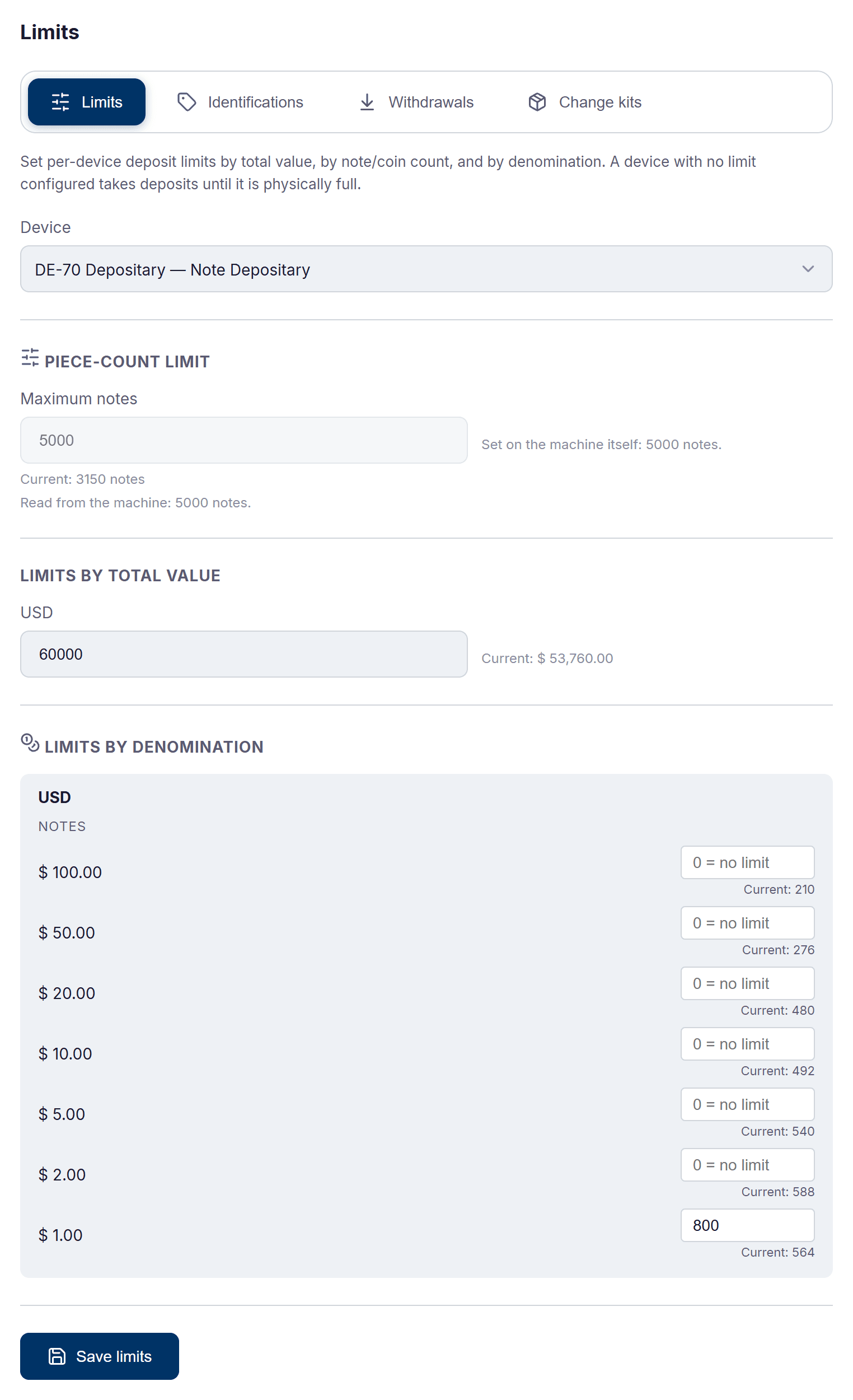
Set the limits of a device
Open Settings › Transactions and stay on Limits.
In Device, choose the device.
Fill in only the limits the customer asks for:
| Limit | What it counts |
|---|---|
| Maximum notes | How many notes the device may hold. |
| Maximum coins | How many coins (only on devices that take coins). |
| Limits by total value | The total amount, one field per currency. |
| Limits by denomination | How many pieces of one value, for example 500 notes of 100. |
Under each field, Current shows how much the device holds now. A limit cannot be lower than that.
Tap Save limits. Limits saved appears.
The DE-70: the cassette size comes from the machine
The DE-70 says how many notes its cassette holds: it is the STORAGE LIMIT of the RAS (Cassette capacity shows where it is set). The Smart Safe Client reads it and shows it locked in Maximum notes: Set on the machine itself. To change it, change it on the DE-70.
If the Smart Safe Client cannot read that number from the DE-70, deposits do not start until it can.
Limits per account
If the safe has accounts, Limits for appears: choose This device (physical limit) or one of the accounts.
An account's limit is compared with everything the device holds, from every account, not only with what that account deposited. A deposit is refused by whichever limit is reached first: the device's or the account's.
See how full the device is
On the home screen, profiles with the Transactions permission see the Occupancy bars of each device: Notes, Coins and Value, with the percentage of the limit. The bar turns yellow at 70% and red at 90%. At 100%, deposits stop until a collection.

Withdrawal limits (Cash Infinity)
Withdrawals only exist on a device that pays out money. The DE-70 does not pay out; the Cash Infinity does.
A withdrawal limit is a rule for a profile, a user or an account, in one currency. When several rules apply to the same person, the strictest one counts.
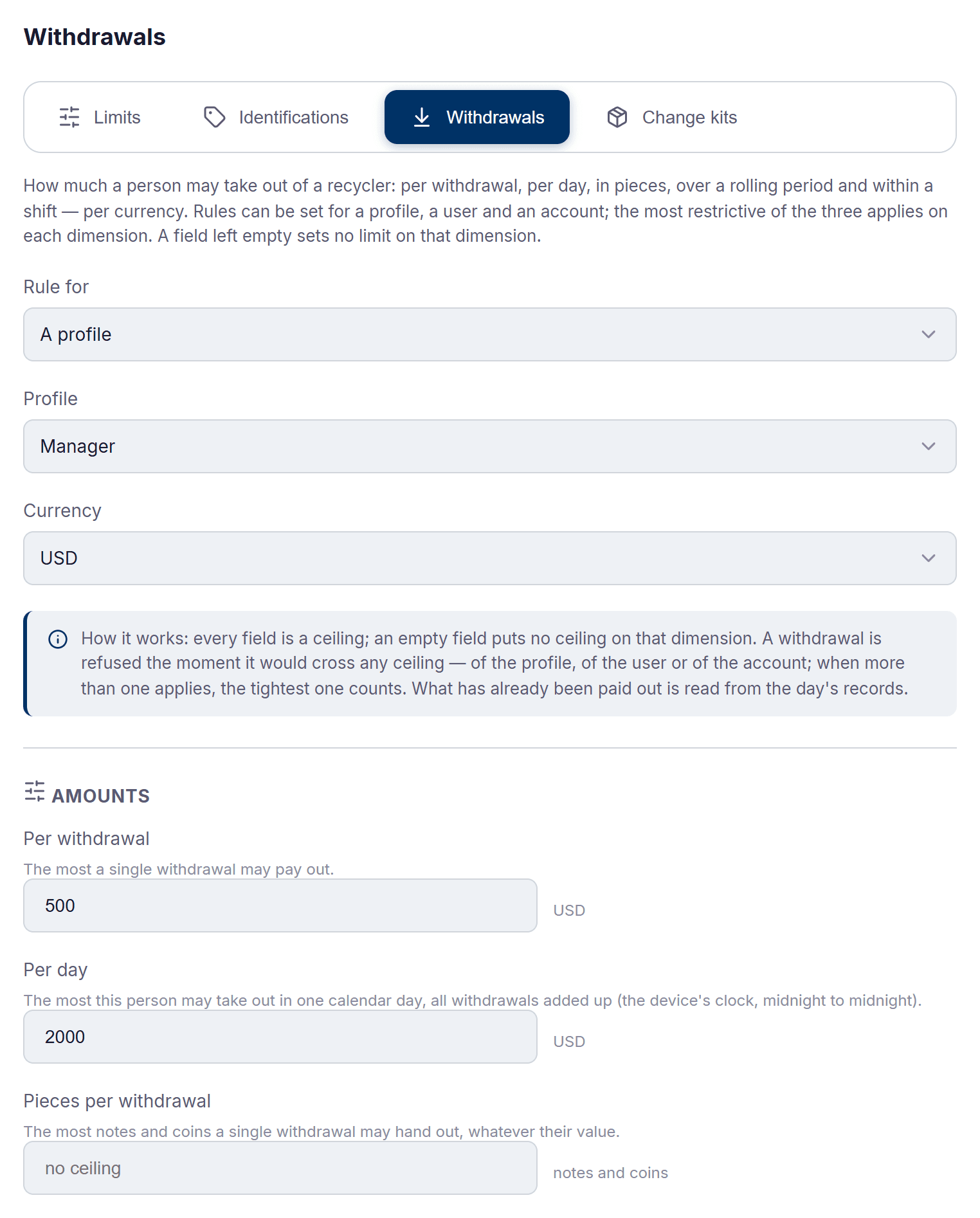
Open Settings › Transactions › Withdrawals.
In Rule for, choose A profile, A user or An account. Then choose which one, and the Currency.
Fill in only the limits the customer asks for:
| Limit | What it counts | Example |
|---|---|---|
| Per withdrawal | The most one withdrawal may pay out. | 500 |
| Per day | All the withdrawals of one day added up (midnight to midnight, by the computer's clock). | 2,000 |
| Pieces per withdrawal | How many notes and coins one withdrawal may hand out. | 50 |
| Rolling period | All the withdrawals of the last hours added up: the amount and the number of hours. | 5,000 in the last 24 hours |
| Shift | All the withdrawals between two times of day added up. A shift may cross midnight. | 2,000 between 08:00 and 18:00 |
The limit per withdrawal cannot be higher than the limit per day.
Tap Save limits. To delete a rule, tap Remove this rule.
What does not count
Paying an amount that the device owes someone (a pending payout) does not count against the withdrawal limits.