
Cash Infinity
Connecting the Cash Infinity, the states and codes it reports, and what to do with each message it shows in an operation or in maintenance.
This page covers the Cash Infinity (CI-50, CI-10 and CI-10X): connecting it, the states and codes it reports, and every message the Smart Safe Client shows about it. First check that the machine is on and without errors, that it is on the same network as the computer, and that its web interface has the settings of Preparing the Cash Infinity
Connecting it
These problems appear when you add the machine in Settings › Devices, or when it does not connect afterwards. How to add it: Devices
| Problem | What to do |
|---|---|
| It does not connect | Check the network: the computer and the Cash Infinity must be on the same network. In Settings › Devices, Port must be 80 (443 with Use HTTPS on). Without HTTPS, Accept HTTP Access must be Enable on the machine. See Settings |
| Test connection says "This FCC answers only on HTTPS (HTTP access is off on it): turn on “Use HTTPS” below." | The machine has Accept HTTP Access off. Turn on Use HTTPS in the device (Secure connection (HTTPS)), or turn HTTP access on in the machine (Settings) |
| "The FCC presented a certificate other than the trusted one. If the team replaced the certificate, read the new one in the device settings and trust it; if not, contact support." | The device is on This FCC's certificate only, and the machine now presents another certificate. If the company's IT team replaced it, edit the device, tap Read the FCC certificate, compare the fingerprint and tap Trust this certificate. If nobody replaced it, do not trust it: open a ticket |
| "The FCC certificate did not pass the configured check (company CA, validity or address). Check the certificate in the device settings." | The device is on Certificate issued by the company's CA. The technical line in brackets says why: the certificate was not issued by that CA (or an intermediate certificate is missing from the file), it has expired, or it does not name the machine's address (with the address check on). The machine's factory certificate never passes this check: use Encrypt only for it. |
| "The FCC is asking for a client certificate (client certification is on in its SSL configuration). Import the client certificate in the device settings, or turn that option off on the FCC." | On the machine, SSL Configuration › E: HTTPS Client Certification Setting is on, and this device has no client certificate to present. If the customer does not want client certification, turn that option off on the machine and restart it. If the customer wants it, import the certificate the IT team gave you: see Client certificate |
| When importing the client certificate: "The certificate could not be imported. Check the file and its password." | The password goes before the file: type it in Certificate file password (blank if it has none), then tap Import certificate file… and choose the file. Check that it is the .p12 file the IT team gave you (it may also end in .pfx). If the password is still refused, ask the IT team for it again. |
| "The FCC refused the client certificate: it was not issued by a CA the FCC trusts for client certification. Import, in the device settings, a certificate issued by that CA." | The machine did not accept the imported certificate. Check these three things with the customer's IT team. Another CA on the machine: section E of SSL Configuration has the file of a different CA than the one that issued this certificate. Load the right CA's file there, restart the machine and wait about a minute. Expired certificate: in the device, compare Valid until with today's date, and ask for a new certificate. Wrong file: ask for the right one and import it. How to import it: Client certificate |
| Encrypted events are on, but the machine's notices do not reach the computer: the app's log records "the device refused this computer's certificate for events" | The machine does not trust, for its events, the CA that issued the client certificate. Load that CA's file in section A of SSL Configuration, restart the machine and wait about a minute. If the customer does not need the events encrypted, turn off Receive the FCC events encrypted in the device instead. See Encrypted events |
| "The secure connection (HTTPS) to the FCC could not be opened. Check the port (usually 443) and that HTTPS is on in the FCC." | In Settings › Devices, Port must be 443 with Use HTTPS on. Check that the browser opens https:// and the machine's address. |
| Find on the network finds nothing: "Nothing answered across the … address(es) checked. Make sure the device is switched on and on this same network." | The search only looks in the computer's own network. If the machine has an address of another network (for example 192.168.0.25, the factory one, while the computer has 192.168.1.40), it is not found: type the machine's address in Host, and put the computer on the same network as the machine. On Linux, see A fixed address for the network cable |
| "No local network was detected, so there was nowhere to look. Check the network cable or Wi-Fi connection." | The computer has no network. Check the cable or the Wi-Fi in Settings › Network. See Network and internet |
| It says the Cash Infinity's firmware is older than the Smart Safe Client works with: "This Cash Infinity runs …, older than …, the oldest firmware the Smart Safe Client works with. It must be updated before the machine can be used: contact GLORY support." | The controller version must be ISP-K05B or ISP-K05H 18.40, or ISP-K35A 1.6.0.0, or newer. Open a ticket with the version the message shows. See Minimum version |
| The browser says Forbidden when opening the web interface | Type only http:// and the address, for example http://192.168.0.25, with nothing after it. |
The web interface does not open with http:// | Many Cash Infinity machines leave the factory with HTTP access turned off. Use https://, for example https://192.168.0.25, and turn HTTP access on. See Preparing the Cash Infinity |
| You do not know the Cash Infinity's address | Connect a screen directly to the controller and restart it: it shows its address while it starts. See The device's address |
| Test connection fails even though the network is fine | The test signs in with the machine's own glory user, and that user has neither one of the passwords recommended by GLORY nor the one in Cash Infinity administrator user password. If the technician gave it another password, type it in that field. Do not change the password on the machine on your own: read The device's glory user and open a ticket |
| "The Cash Infinity refused the administrator user's password. Check the password in the device settings with the technician who installed it. So as not to lock the device, the application only tries again at …; a new password saved in the settings is tried before then." | The machine's glory user refused its password. So as not to lock the machine, the Smart Safe Client sends nothing to it for about 20 minutes, until the time the message shows. Ask the technician for the glory user's password, type it in Cash Infinity administrator user password in Settings › Devices and tap Save: it is tried at once. Restarting the machine does not help. See Devices |
| It does not create the users on the machine (the screen may show "The machine answered code 98: parameter error (type error)") | Check Password Strength must be set to Disable on the machine, and the machine restarted. See Settings |
| This username is not accepted by the Cash Infinity — "…(letters without accents, digits and _, up to 10). Ask an administrator to rename the account." | The username can have up to 10 characters: letters without accents, digits and _. The password, 1 to 16 characters. Change them in Settings › Users. See Users |
| "The machine refused the user or the password set for it. Check them in the device settings.", with "The machine answered code 15: user authentication failure" | On the Cash Infinity there is no user or password in the device settings: the session is opened with the person who signed in. When the machine refuses that person, the Smart Safe Client creates their user again on the machine with its glory user. If it is still refused, the machine's glory user has neither a recommended password nor the one in the device settings (row of the administrator user's password above), or Check Password Strength is on (row above). It is not tried again on its own: sign out and sign in again. |
After several refused sign-ins, the machine refuses everyone, even its own glory user with the right password | The Cash Infinity locks itself after a few refused sign-ins in a row: six in a few seconds are enough. It stays locked for up to about 20 minutes, even if the machine is restarted. Wait 20 minutes without trying, then try once. |
| "The machine answered code 16: number of session over" | Too many programs or computers have a session open on this Cash Infinity. Close the ones that are not in use. |
| The deposit does not show the live count, or an operation is refused saying the FCC events do not arrive | Test connection does not test this: confirm it with a deposit. See The machine's events do not arrive On Windows, allow inbound TCP 55562 in the firewall as Allow port 55562 on Windows shows. |
Could not connect to the device., with a technical line that names 55562, such as "failed to bind … 55562" | Another program on this computer already uses port 55562: for example, a second Smart Safe Client open, an earlier program for the safe, or a browser opened from an earlier version of the Smart Safe Client. Close it, or restart the computer. On Windows, to find out which one: open PowerShell and type Get-NetTCPConnection -LocalPort 55562; the number under OwningProcess is the program. In Task Manager, Details tab, look for that number in the PID column and end that program. |
"Not at rest" for a few seconds, and on the Maintenance screen a mechanism shows 8100 STATE_LOG_READ_BUSY — Reading the logs | The machine is reading its own logs. Set Auto Device Log Read Interval to 0 on the machine, and restart it. See Settings |
| The session with the machine is no longer valid — "…It is opened again automatically in a few seconds; try again." | The same user is signed in on another program or computer, and the two sessions knock each other out. Try again, and use a different user in each place. See One user, one place |
The machine's states
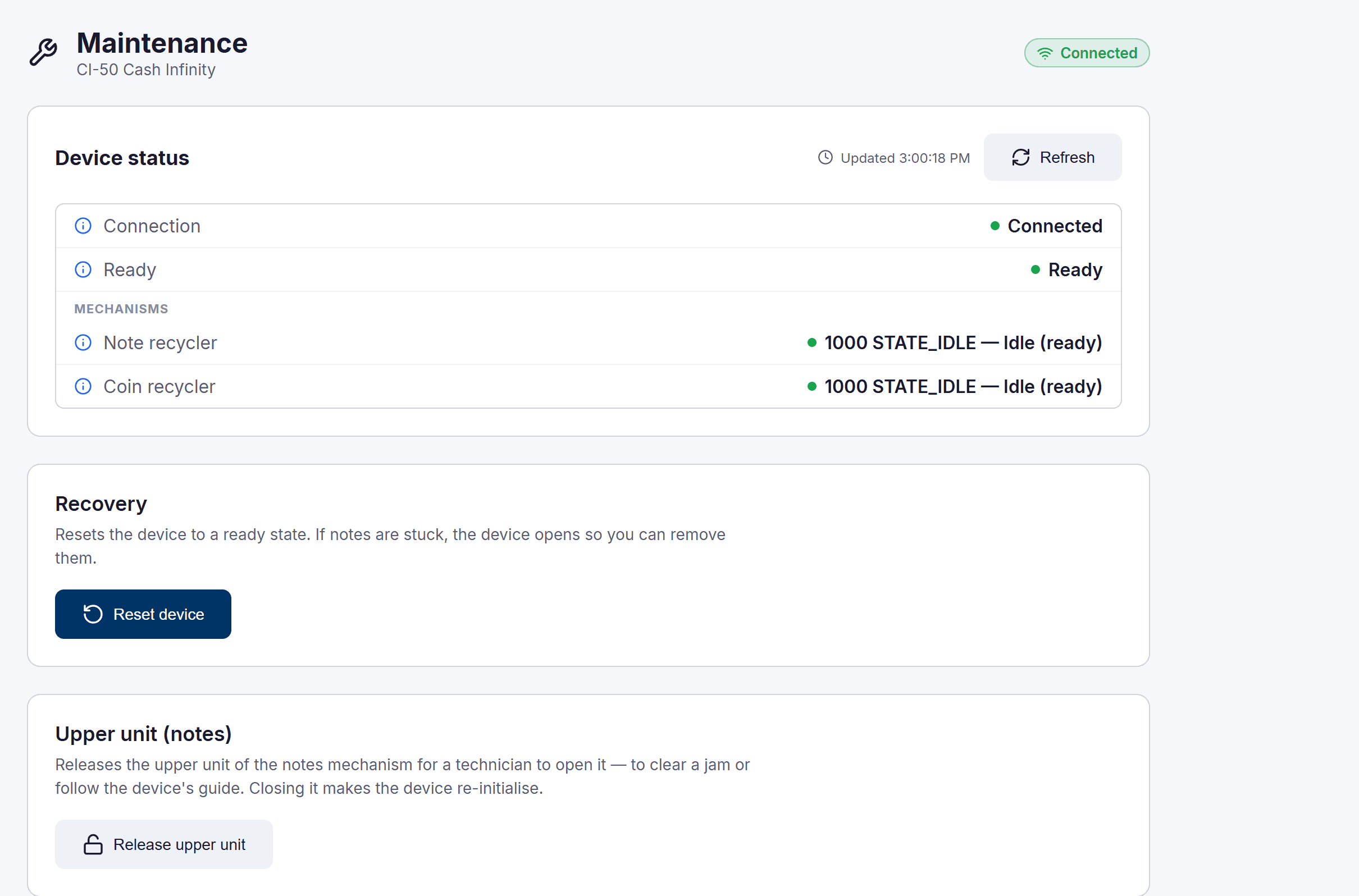
On the Maintenance screen, Device status shows Connection, Ready, Occupied (another operation is using the machine) and Error. Under Mechanisms, the Note recycler and the Coin recycler each show their state: a number, the machine's name for it and a word, for example 1000 STATE_IDLE — Idle (ready). Refresh reads them again.
| State on the screen | What it means | What to do |
|---|---|---|
1000 STATE_IDLE — Idle (ready), or 1500 STATE_IDLE_OCCUPY — Idle (held by the session) | At rest and ready. | Nothing. |
2000 to 2700 — Deposit, Waiting to store, Storing, Counting, Replenishing | Taking money in. | Wait for the operation to end. If no operation is running and it stays like that for minutes, tap Reset device: it closes what the machine was holding, and the Smart Safe Client records it (see An error in the middle of an operation) |
2500 — Waiting for the cash to be taken back, or 3100 — Waiting for the cash to be taken | Money is waiting at the outlet. | Take the money from the outlet. The machine goes on only when the outlet is empty. |
3000 — Dispensing, 4000 to 4055 — Refill, 6000 to 6600 — Collecting or Verifying, 7000 and 7100 — Inventory | Working. | Wait. During a collection, finish the swap. |
5000 STATE_RESET — Restarting the equipment | Resetting. | Wait: some resets take minutes. |
8000 — Downloading data, 9100 STATE_BUSY — Busy | Working. | Wait. |
8100 STATE_LOG_READ_BUSY — Reading the logs | Reading its own logs, busy for a few seconds. | Set Auto Device Log Read Interval to 0 on the machine and restart it, as step 4. Settings of the preparation shows |
9200 STATE_ERROR — Error | A mechanism stopped on a fault. | Follow the machine's guide (Last error reported by the device) and tap Reset device. |
9300 STATE_COM_ERROR — Communication error | The machine's controller is not talking to that module. | Tap Reset device. If it stays, check how the modules are connected, as Communication error (9300) shows |
9400 STATE_WAIT_FOR_RESET — Waiting for a restart | It waits for a reset. | Tap Reset device. |
9500 STATE_CONFIG_ERROR — Configuration error | The machine reports a configuration error. | Open a ticket with a photo of the Maintenance screen and the Glory Device Connection Logs, as Which logs to send, and which days shows |
50000 STATE_LOCKED_BY_OTHER_SESSION — Locked by another session | Another program or computer holds the machine. | Wait for it to finish, or close the other program. If it takes long, tap Reset device on the Maintenance screen. |
| Unknown state (…) | A state the Smart Safe Client does not know. | Open a ticket with a photo of the Maintenance screen. |
Communication error (9300): check the modules
The Cash Infinity has a controller and the modules that handle the money: one for notes and, when the machine takes coins, one for coins. When the Maintenance screen shows 9300 STATE_COM_ERROR on the Note recycler or on the Coin recycler, the controller is not talking to that module. Usually a cable came loose, or the module is set up differently from how it is connected.
Check it in the machine's web interface, signed in with the user glory as Sign in to the web interface shows. Its pages are always in English.
Open App Configuration and go to F: Equipment Setting. Note Device and Coin Device must be the models really installed in the machine, for example CI-50B for notes and CI-10CX for coins. If the machine has no coins module, Coin Device must be NONE.

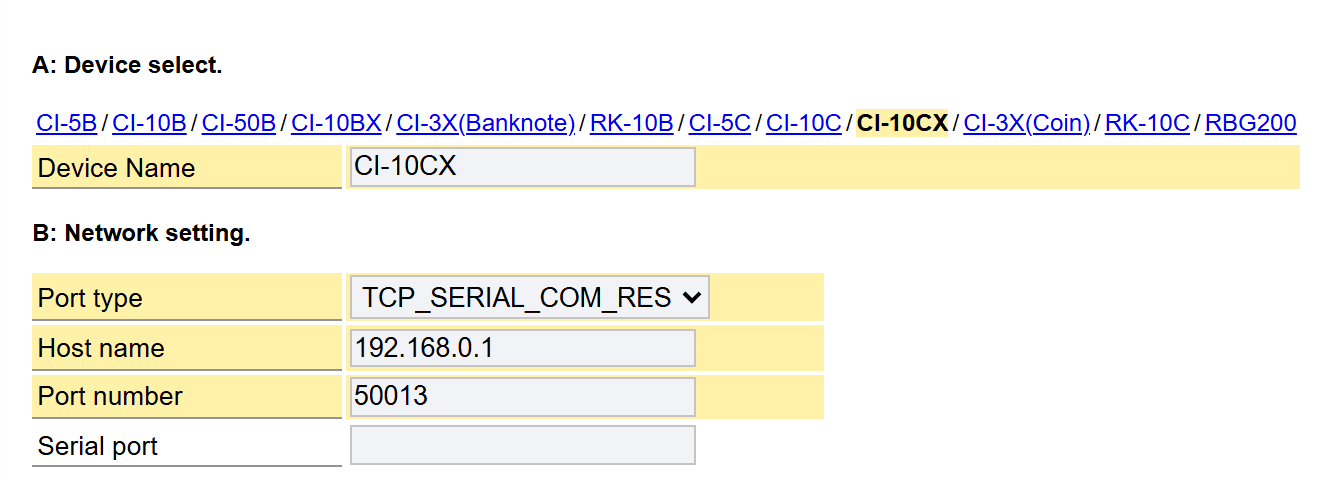
Open Device Configuration. In A: Device select, click the model of the module in error, for example CI-50B: Device Name shows it. In B: Network setting, Port type must match how that module is connected to the controller:
| Port type | The module is connected | Check |
|---|---|---|
| USB_SERIAL_COM_RES | By a USB cable | That the cable is plugged in at both ends, and that Serial port is filled in |
| TCP_SERIAL_COM_RES | By a network cable | The cable, and that Host name and Port number are the module's address and port |
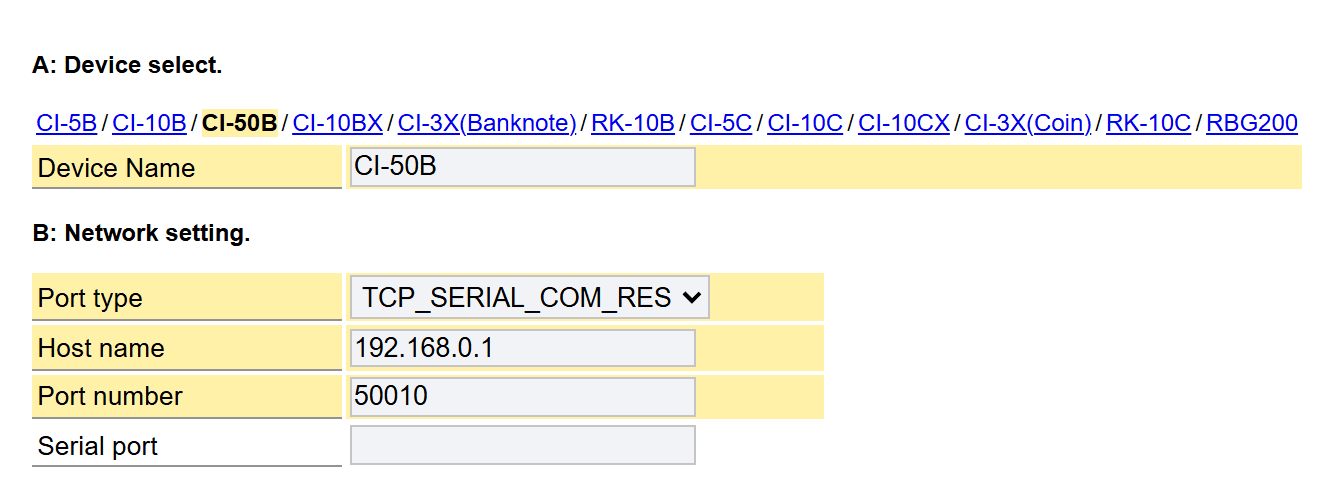
Check the other module the same way: click its model, for example CI-10CX.
If you change something, take a photo of the page first, so you can put it back. Click SAVE SETTING at the bottom of the page (on App Configuration, SAVE) and restart the machine: OS › Turn off / Reboot › Reboot Control › OS REBOOT. When it is back, tap Refresh on the Maintenance screen and, if the module is still in error, Reset device.
The address and the port numbers in the pictures are only an example: each machine has its own.
If it is still 9300, open a ticket with photos of the Maintenance screen and of each module's Device Configuration page, and the Glory Device Connection Logs, as Which logs to send, and which days shows
Before an operation starts
| The screen says | What to do |
|---|---|
| "This device is not connected. Reconnect it and try again." or "The device is not connected. Nothing can be paid out until it is." | Check the power and the network. The Smart Safe Client connects again on its own every 15 seconds. |
| The device is not responding — "The connection opened, but the machine did not answer. Check that it is switched on and reachable on the network, then try again." | Check that the machine is on, its network cable, and that its address has not changed. |
| "This device is busy with another operation. Wait for it to finish and try again." or "Another operation is running on this machine. Wait for it to finish." | Another operation, or another program, is using the machine (the message may add "code 11: exclusive error"). Wait and try again. |
| "The machine is not at rest. Wait for it to finish, or clear the fault, and try again." or "The device is not ready (in error, or still working). Recover it first — Reset from Maintenance — and try again." | Open the Maintenance screen and look at the mechanisms' states (table above): take any money from the outlet, wait if it is working, or follow the guide and tap Reset device if it is in error. |
| "Could not read the device inventory. Connect the device and try again." or "The device's contents could not be read. Nothing was paid. Check the device and try again." | The machine did not answer, or is not at rest. Check the connection and the Maintenance screen, then try again. |
| "The cash in the device doesn't match the expected amount…", "The device's contents differ from the books. Nothing was paid; the device is held for reconciliation." or "This device is held for reconciliation — waiting will not clear it. Ask a manager to reconcile it before…" | The machine is held. See An error in the middle of an operation |
The machine's events do not arrive
The Cash Infinity tells the Smart Safe Client everything that happens in an operation (the cash counted, the door opened, the cassette taken out) by sending events to this computer, on the Event Port (usually 55562). Without them the operation would sit waiting. So before a deposit, a payment, a change, a withdrawal, a transfer, an emptying, a collection or a replenishment starts, the Smart Safe Client checks that the events are arriving. If they are not, the operation does not start and nothing moves in the machine: the screen says why, and nothing is recorded or printed.
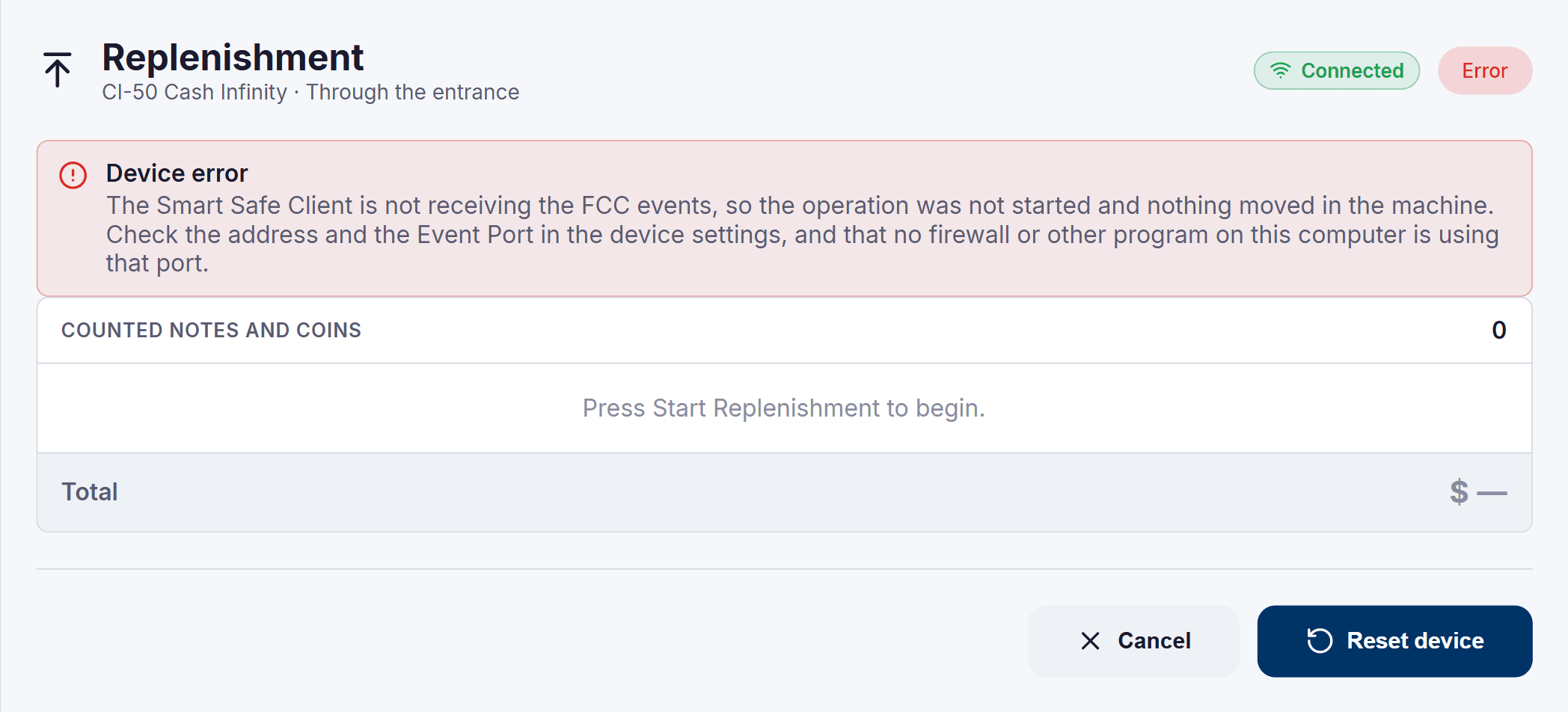
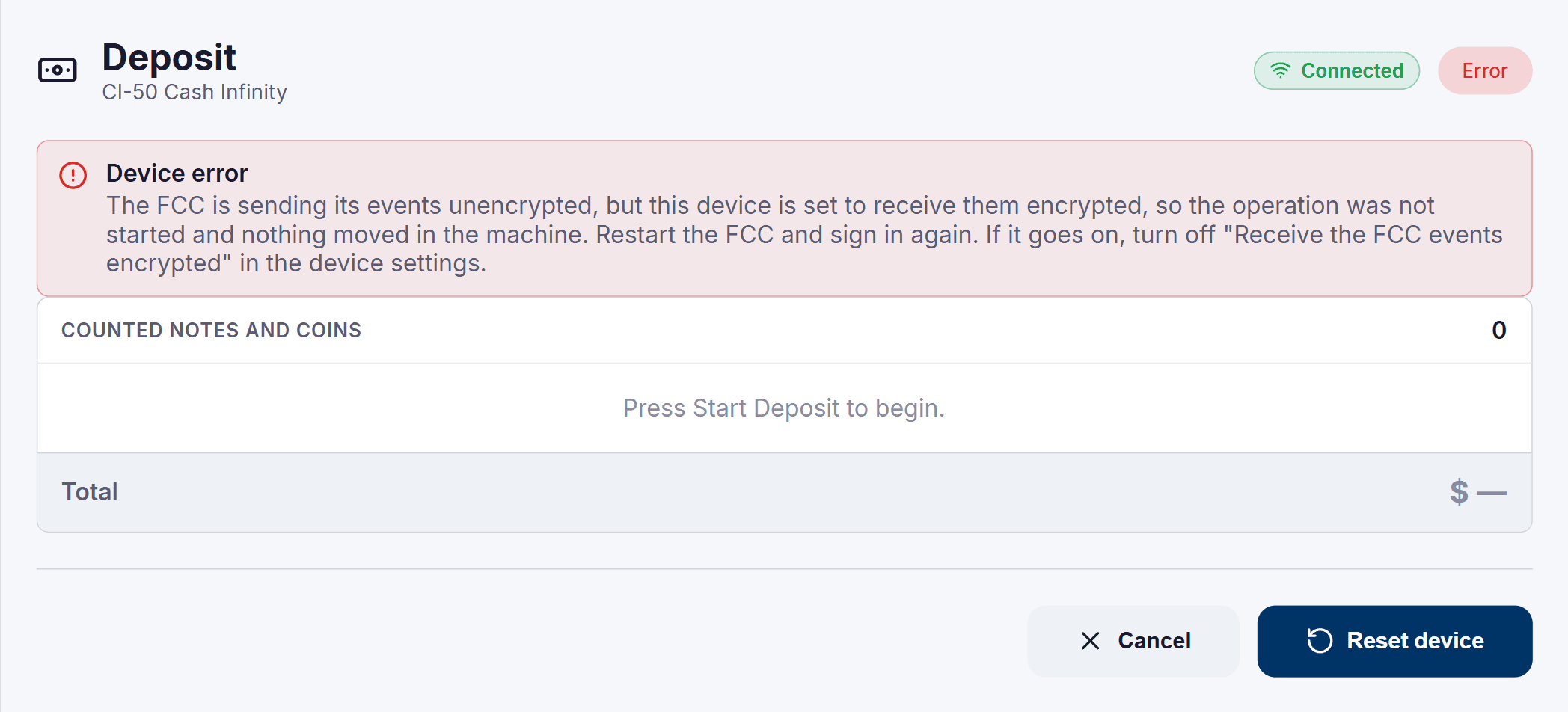
This does not block the Maintenance screen: the status, the inventory, the reset and locking or unlocking a unit keep working.
| The screen says | What to do |
|---|---|
| "The Smart Safe Client is not receiving the FCC events, so the operation was not started and nothing moved in the machine. Check the address and the Event Port in the device settings, and that no firewall or other program on this computer is using that port." | In Settings › Devices, check the machine's Host and Event Port. On Windows, check that the port is allowed in the firewall, as Allow port 55562 on Windows shows, and that no other program holds it (the 55562 row in Connecting it shows how to find out). Then sign out, sign in again and try the operation. |
| "The FCC is sending its events unencrypted, but this device is set to receive them encrypted, so the operation was not started and nothing moved in the machine. Restart the FCC and sign in again. If it goes on, turn off "Receive the FCC events encrypted" in the device settings." | Restart the machine (OS › Turn off / Reboot › Reboot Control › OS REBOOT in the web interface), wait about a minute, then sign out and sign in again in the Smart Safe Client. If it goes on, turn off Receive the FCC events encrypted on the device. See Encrypted events |
| "The FCC refused this computer's certificate for the encrypted events. Add the CA that issued it to the FCC (SSL configuration, section A) and restart the FCC, or turn encrypted events off in the device settings." | The machine does not trust the CA that issued this computer's certificate. Load that CA's file in section A of SSL Configuration, restart the machine and wait about a minute, or turn off Receive the FCC events encrypted on the device. |
When no event has arrived since the person signed in, the Smart Safe Client asks the machine for its status and waits for the answer to come back as an event. So the screen may keep working for up to about 25 seconds before it shows the first message above.
When the machine cannot pay, or has no room
The Inventory shows how full each recycler is: the bar turns amber from 80% and red from 95%. A full recycler sends the next pieces of that value to the collection cassette (or the coin box). See Inventory
| The screen says | What to do |
|---|---|
| "This device has reached its COIN COUNT deposit limit…" or another deposit limit | Collect the coin box (or the note cassette), or raise the limit. See Operations |
| The device cannot pay the full amount — "… was requested and the device can pay … with what it holds…" | Tap Pay what it can: the rest becomes a pending payout to that person. Or tap Cancel. See Withdrawal |
| "The device holds nothing it can pay out in this currency." or "The device holds nothing it can pay towards this amount. It has to be fed — ask the manager for a deposit or a replenishment." | The recyclers are empty for that currency. Do a replenishment |
| "The device does not hold enough … (… available). Wait for a replenishment of those pieces, or ask for the amount by value and let the device choose the pieces." | Choose other pieces, or ask By amount. |
| "The device does not hold the pieces of this kit: …" | Replenish those notes or coins, or pay something else. |
| "No change kit is available to you on this device…" | A kit appears only to the profiles and people it is assigned to, and only on a device with its currency. See Change kits |
| "The recyclers have nothing to pay back with. Replenish the machine before exchanging." or "The machine cannot hand … back in any combination of the pieces it holds…" | Replenish the machine before exchanging, or leave the exchange owed. See Change |
| "The recyclers are empty: there is nothing to transfer." (or "…to empty.") | Nothing to move. |
| "The recyclers do not have enough … (… available). The list was read again." | The machine holds fewer pieces than you chose: choose again from the list, which is now up to date. |
| The device could not return the cash — "The return was requested, but the device could not pay all of it back…" | The machine paid back what it could. What it could not stays deposited, and the receipt says so. See Give the money back |
The collection cassette, the coin box and the interface cassette
| The screen says | What to do |
|---|---|
| "Your profile may not collect this machine's note cassette or its coin box." | The profile needs the Note cassette collection permission or the Coin box collection permission. See Profiles and permissions |
| "The note cassette is empty and there are no manual deposit envelopes: there is nothing to collect." or "The coin box is empty: there is nothing to collect." | Nothing to take out. To collect money from the recyclers too, do a transfer first. |
| "The machine is not at rest. Wait for it to finish, or clear the fault, and try again." | See the machine's states |
| Machine fault (…) during the swap. — "If the cassette is already out, finish the swap. Within … the machine checks what left and the collection ends at that figure." | Finish the swap: put the empty cassette (or box) in. Within two minutes, the machine checks what left. |
| "Collection …: nothing left the machine and no collection was recorded." | Nothing was collected. |
| "COLLECTION NOT DONE. Nothing was taken out of the machine in time." | The container was not taken out in time (the swap has 30 minutes). Nothing was recorded. Start again. |
| "COLLECTION NOT DONE. What was taken out went back into the machine: nothing left it." | The same cassette (or box) was put back full, so nothing was collected. That is the way to give up a collection already started. |
| "The machine had a fault during the swap; the amount is what its inventory measured. Reset the machine from Maintenance before using it again." | The collection is recorded. Open the Maintenance screen and tap Reset device. |
| "The machine could not be read after the swap: the amount is the machine's own figure, and the machine is held until it is checked on the Recovery screen." or "Collection … stopped on a machine fault (…) and the machine did not say what left…" | The machine is held, and an INCIDENT NOTICE may print. See An error in the middle of an operation |
| "This machine has no collection cassette (I/F), and your profile only has replenishing from the cassette. Ask a manager to grant replenishing through the entrance on the profile screen." | Replenish through the entrance: the profile needs the Replenish through the entrance permission. The way From the interface cassette appears only when the machine reports an interface cassette. If the machine has one and the way does not appear, open a ticket |
| "The machine refused the replenishment from the interface cassette. Check that the cassette is fitted and loaded and try again; if it keeps refusing, call support." | Check that the interface cassette is fitted and loaded, and try again. If it keeps refusing, open a ticket with a photo of the message. |
| "The replenishment ended with nothing moved into the recyclers. Nothing was recorded." | The cassette had nothing the machine could move, or the recyclers had no room. Check the cassette and the Inventory. |
When an operation stops on a fault
When the machine stops on a fault, the operation screen shows Device error (or Device fault), with the machine's code, and below it the machine's own guide: a picture of what to open and what to take out. If the picture cannot be shown, the screen says "The guide could not be shown here. Open it in a browser on this network:" with an address: open it in a browser on a computer on the same network.
| What you see | What to do |
|---|---|
| In a deposit or a replenishment: Device error | Follow the machine's guide and tap Reset device. The reset confirms the money that had entered, and the Smart Safe Client records it and prints the receipt. See Deposit |
| A deposit paper that says "DEPOSIT INTERRUPTED BY A DEVICE ERROR. … were counted and are inside the device (error …), which could not be reset. The amount will be confirmed when the device is recovered; the device is locked until then." (for a replenishment, "REPLENISHMENT INTERRUPTED BY A DEVICE ERROR. THIS NOTICE IS NOT A RECEIPT…") | The reset failed with money inside. The machine is held. A person resets it on the Maintenance screen and releases it on the Reconciliation Required screen. See An error in the middle of an operation |
| In a withdrawal: Device fault during the payout — "The device reported fault …. What came out has been recorded; anything it could not pay is a pending payout. Follow the device's guide below to recover it." | What came out is recorded, and the rest is owed to that person. Reset the machine on the Maintenance screen, and pay the pending payout later. |
| In a payment: "The machine reported a fault (…) with the payment open. It is not waiting for the customer any more. It answers nothing until it is reset on the maintenance screen — ask a manager." | Tap Stop and call for help: an INCIDENT NOTICE prints. See An error in the middle of an operation |
| "The machine would not take the cancel: … The payment is still open and the cash is still inside. The device has to be recovered on the maintenance screen — ask a manager." | The machine is in error. Reset it on the Maintenance screen. |
| In a change, after Give up: "The machine would not hand the cash back. … stays open and the device is held — the money is still inside it…" | An INCIDENT NOTICE prints. See An error in the middle of an operation |
| In a transfer or an emptying: Device fault — "The device reported a fault (…). No transfer can start until it is cleared." (or "No emptying starts until the fault is cleared.") | Reset the machine on the Maintenance screen first. |
| An INCIDENT NOTICE printed | The machine stopped while moving money and could not say how much. It is not a receipt. See An error in the middle of an operation |
The screens that pay out (withdrawal, payment, change, transfer, emptying) have no reset button, on purpose: resetting with a note stuck in the wrong place can tear it. The reset is done on the Maintenance screen.
Maintenance: the reset and the upper unit
In a new installation, the Administrator, the Manager and the Technician can open the Maintenance screen. See Inventory and maintenance
| What you see | What to do |
|---|---|
| Last error reported by the device | The last fault, when it happened, on which mechanism (Note recycler or Coin recycler), and the machine's guide. Follow the guide before the reset. The code stays there after the reset: put it in the ticket if the fault comes back. |
| The reset runs for a long time: "In progress for …" | Some resets take minutes. Keep the screen open. |
| "The device has been resetting for … min. It may be waiting for something to be done to it: check for an open unit or stuck notes, follow its guide below, and keep this screen open until it finishes." | After 4 minutes the machine is usually waiting for a hand: close any open unit, take out stuck notes as the guide shows, and wait. |
| Recovery failed — "The device did not accept the reset — it is still in error, or resetting on its own. Check for an open unit, follow the device's guide, wait for it to be idle and try again." | Do what it says, and tap Reset device again. Repeat as many times as needed. |
| Recovery failed — "The equipment could not be recovered." | Follow the guide and try again. If it keeps failing, open a ticket with photos of the machine and of the Maintenance screen, and the code. |
| "The machine is not saying what it is doing — another operation may still be holding it. The reset below is available anyway: it is what ends that." | Tap Reset device. |
| Deposit recovered or Replenishment recovered — "The … interrupted by the error was completed by the recovery…" | The reset finished an operation that a fault had interrupted. Its receipt can be printed again from Reports |
| Machine released | The machine was holding a deposit (or a replenishment) it could not finish, and the reset confirmed it. The message says the amount, and a slip prints. |
| The guide asks to open the upper unit | Tap Release upper unit and confirm. "Upper unit released — open the top of the device": open it and do what the guide says. Close it: "Upper unit closed — the device is re-initialising, please wait." See Upper unit |
| "… is held in the device's upper unit (…) — pieces a payout could not deliver, pulled back inside when the device was reset…" (on the Reconciliation Required screen) | Those notes are counted, but they are not in a recycler. Leave them there. If someone takes them out by hand, the next check reads it as a difference and the machine is held. |
The machine's codes
The Cash Infinity reports two kinds of code.
Fault codes. "Device error code: …", or "fault …" in a message, with the guide picture. Follow the guide and reset the machine on the Maintenance screen. If the same code comes back, open a ticket with the code and a photo.
Answer codes. Some messages end with "(The machine answered code …: …)": the machine's own answer to what was asked.
| Code | What it usually means | What to do |
|---|---|---|
| 2 "reset" | The operation ended because the machine was reset. | Check the result on the screen and on the Reports screen before doing the operation again. |
| 4 "occupation not available", 5 "not occupied", 17 "occupied by itself", 20 "session not available" | The session could not hold the machine at that moment. | Try again. If it repeats, sign out and sign in again. |
| 6 "designation denomination shortage" | The machine does not hold the notes or coins that were asked for. | Ask By amount, or replenish those pieces. |
| 9 "cancel change shortage", 10 "change shortage" | Not enough notes or coins to pay back or to give change. | Replenish the machine. What could not be paid is recorded, and the receipt says so. |
| 11 "exclusive error" | Another operation is using the machine. | Wait and try again. |
| 12 "dispensed change inconsistency" | What came out differs from what was asked. | Check the outlet. The machine's own count settles the operation: see An error in the middle of an operation |
| 13 "auto recovery failure", 100 "device error" | A mechanism stopped and could not recover on its own. | Follow the guide and tap Reset device on the Maintenance screen. |
| 15 "user authentication failure" | The machine refused the user or the password. | See Connecting it |
| 16 "number of session over" | Too many sessions are open on the machine. | Close the programs or computers that are not in use. |
| 32 "verify collect/replenish failed" or "I/F collection cassette verification ON", 33 "I/F collection cassette illegal denomination", 40 "invalid cassette number", 41 "improper cassette" | A problem with a cassette, usually the interface cassette. | Check the cassette that is fitted. If it repeats, open a ticket with the code. |
| 34 "shortage of capacity of stacker" | The recyclers have no room for what was asked. | Make room with a transfer or a collection, and try again. |
| 96 "duplicate transaction" | The machine's Duplicate transaction check is on. | Set it to Disable and restart the machine. See Settings |
| 98 "parameter error (type error)" | The machine refused a value it was sent. | If it happened while users were created, Check Password Strength must be Disable. Otherwise, see Connecting it and open a ticket |
| 99 "program inner error" | An internal error of the machine. | Try again. If it repeats, open a ticket |
| Any other code | — | Open a ticket with a photo of the message. |
When the machine is held
After some of the problems above, the Cash Infinity is held: the home screen shows Needs reconciliation, and its money operations do not start until someone checks it. The Maintenance and Inventory screens still open. The messages call the Reconciliation Required screen "the Recovery screen". What to do, step by step: An error in the middle of an operation
Not solved?
Open a ticket with a photo of the screen and, if there was an operation, its reference. Attach the logs that come checked in Settings › Support (above all, the Glory Device Connection Logs), from the day before the problem until today. More about the logs: Which logs to send, and which days
DE-70
Finding and connecting the DE-70, its serial port, and what to do with each message it shows in a deposit, a collection, maintenance or a count.
Operations
An operation that does not start, the limits, the identifications, the amounts typed, the money a machine still owes, and the other problems common to both devices.