
DE-70
Finding and connecting the DE-70, its serial port, and what to do with each message it shows in a deposit, a collection, maintenance or a count.
This page covers the DE-70: connecting it to the computer, and every message the Smart Safe Client shows about it. Most DE-70 problems come from one of three things, so check them first:
- The DE-70 is on its main menu (the counting screen), not in the RAS or in another menu. Only there does it talk to the Smart Safe Client.
- The cable is plugged in at both ends, and the DE-70 is on, with no error on its own screen and the reject tray empty.
- The DE-70 has the right settings, above all protocol A and the operation mode: see Preparing the DE-70
The SERVICE menu asks for a key combination
Some answers on this page send you into the DE-70's SERVICE menu, inside the RAS. SERVICE only opens with a specific key combination, which is not in this documentation. If you do not know it, ask a GLORY technician or a trained technician from the distributor (dealer) for help. To reach GLORY, open a ticket
Finding and connecting it
These messages appear in Settings › Devices, when you add or edit the DE-70. How to add it: Devices
| Problem | What to do |
|---|---|
| Find the device does not find the DE-70, or says "Nothing answered on the … serial port(s) checked. Make sure the device is switched on and its cable is connected." | Put the DE-70 on its main menu, outside the RAS. Check the cable at both ends, and that the DE-70 is on and without errors. Close any other program that uses the port (for example, an earlier program for the safe): a serial port cannot be shared. You can also choose the port by hand in Serial Port (or tap Enter manually) and leave Baud Rate at 9600. If all of that is fine and it still does not find it, confirm protocol A: in USER MENU › INFORMATION, MACHINE tab, the TYPE line must say DE-70A. If it says something else, this cannot be fixed on the computer: open a ticket with a photo of that screen. See Protocol A |
| "There is no serial port left to check: this computer reports none, or every one of them already belongs to a peripheral. Check the cable and the USB adapter driver." | The computer sees no free serial port. Plug in the cable, or the USB-to-serial adapter. On Windows, the port must appear in Device Manager (see the serial port below). A port already given to a peripheral in Settings › Peripherals (sensor board, UPS, shutter) is not checked. |
| "The port … is held by another program — often this application itself, with the device already configured and connected. Close the other program, or use the device that is already set up." | Three possible causes. The DE-70 is already added and connected in Settings › Devices: there is nothing to find. Another program is using the port: close it. On Linux, the user has no permission to use the serial ports, which shows up this way: see the serial port below. |
| It connects, but does not respond | Check on the DE-70: 9600 baud, 7 bits, even parity, 1 stop bit. They are in the RAS, in SERVICE › MACHINE SETTINGS › INTERFACE (SERVICE asks for the key combination, see the notice above). The Smart Safe Client always uses 7 bits, even parity and 1 stop bit: change them on the DE-70, never on the computer. See Communication |
| "Could not detect the baud rate. Check the cable and port, and make sure the device is powered on." (after Detect baud) | The DE-70 did not answer at any speed. Put it on the main menu, check the cable and the port, and choose 9600 by hand. |
| Test connection still fails after you changed the Baud Rate | Tap Save first, and then Test connection: on a DE-70 that is already connected, the test uses the connection that is open, with the saved settings. |
| Fetch from device shows "Could not read the device; showing the standard currency list." | The DE-70 did not answer: put it on the main menu, check the cable and tap Fetch from device again. If the customer's currency is not loaded on the DE-70 (USER MENU › INFORMATION, CURRENCY tab), this cannot be fixed on the computer: open a ticket with a photo of that tab. See Currency |
| "A device (…) already uses this serial port — use another to save." | Each device needs its own port. In Settings › Devices, check which device has that port, and give each one the right port. |
The serial port on the computer
The port's name. With a USB-to-serial adapter, the DE-70's port is called /dev/ttyUSB0, /dev/ttyUSB1… If the computer has its own serial port, it is /dev/ttyS0, /dev/ttyS1… These names are paths: see Folders and paths
To see the USB adapters the computer has now, open a terminal and run (see ls):
ls /dev/ttyUSB*To see which adapter is which, run:
ls -l /dev/serial/by-idEach line names one adapter (its maker and model) and ends with the port it has right now, for example ../../ttyUSB1.
The name can change. Linux numbers the USB adapters in the order it finds them. After the computer restarts, or after an adapter is unplugged and plugged in again, the DE-70's adapter can get another number: for example, the DE-70 moves from /dev/ttyUSB0 to /dev/ttyUSB1 and the sensor board's adapter takes /dev/ttyUSB0. The Smart Safe Client then opens the wrong port, and the DE-70 shows as disconnected or does not answer. To fix it:
Find out which port each adapter has now, with the second command above.
Open Settings › Devices and open the DE-70. In Serial Port, choose the DE-70's port: the list shows the adapter's name beside each port. A port that a peripheral has does not appear in the list: tap Enter manually and type it. Tap Save.
If the safe has a sensor board or another peripheral on a USB adapter, give it its right port too, in Settings › Peripherals. See Peripherals
Wait a few seconds: the Smart Safe Client connects to the DE-70 again on its own.
The permission to use the port. The user who runs the Smart Safe Client needs permission to use the serial ports. The installer gives it. Without it, Find the device says that the port "is held by another program", and connecting fails with "Permission denied". In a terminal of that user, run (see usermod and reboot):
sudo usermod -aG dialout $USER
sudo reboot
The DE-70 shows as disconnected
| What you see | What to do |
|---|---|
| Disconnected, Connection error or Reconnecting… at the top of an operation screen, or Disconnected in Settings › Devices | The Smart Safe Client tries to connect again on its own every 15 seconds. Check the power, the cable at both ends, and that the DE-70 is on its main menu. |
| Device not connected — "Connect the machine to start a deposit." | The same checks. |
| The device is not responding — "The serial port opened, but the machine did not answer. Check that it is switched on and connected, then try again." | The port opened, but the DE-70 did not answer: it is off, it is in the RAS or in another menu, the cable is loose, or its communication values are wrong (9600, 7 bits, even parity, 1 stop bit). If it started after a Linux computer restarted, the port may have changed name: see the serial port |
| Could not connect to the device., with a technical line such as "Failed to open serial port" | The port could not be opened: it no longer exists, another program has it, or, on Linux, the permission is missing. See the serial port |
| On the Maintenance screen: "The port is open but the machine is not answering. Check that it is switched on and connected." or "Device not connected." | The same checks. Reset device stays available. |
| It connects and disconnects now and then | Check both ends of the cable and of the USB adapter, and that no other program opens the same port. |
Before a deposit starts
| The screen says | What to do |
|---|---|
| "The cassette is full to the capacity configured IN THE MACHINE. Collect it before depositing more — this ceiling is set on the machine itself and cannot be raised in Settings." | The safe holds as many notes as the DE-70 allows (its STORAGE LIMIT). Do a collection |
| "This device has reached its … deposit limit", with NOTE COUNT, TOTAL VALUE or a DENOMINATION | A limit set in Settings › Transactions was reached. Do a collection, or raise the limit. See Operations |
| "The machine could not tell us how many notes it is configured to hold, so the deposit was not started. Check the device connection and try again." | The DE-70 did not say how many notes its cassette holds, and without that number no deposit starts. Check the connection. If the DE-70 is connected, the cassette capacity is not set on it: in the RAS, MACHINE SETTING › STORAGE LIMIT (this MACHINE SETTING is on the RAS main screen, not inside SERVICE). In Settings › Transactions › Limits, the same problem reads "The machine has not told us how many notes it is configured to hold…". See Cassette capacity |
| "Could not read the device inventory. Connect the device and try again." | The DE-70 did not let the Smart Safe Client read what it holds: it is off or not on its main menu, or it is in error or has notes in its escrow. Open the Maintenance screen: if Ready does not say Ready, tap Reset device and try again. |
| "The cash in the device doesn't match the expected amount. This device is on hold for reconciliation — ask a manager to reconcile it before depositing." | The safe does not hold what the Smart Safe Client expected, so the DE-70 is held. See An error in the middle of an operation |
| "This device is busy with another operation. Wait for it to finish and try again." | Another operation is still holding the DE-70, or the DE-70 is held for reconciliation. Wait a moment and try again. If it repeats, look for the Needs reconciliation sign on the home screen. |
| Attention, with a sensor message such as "The safe door is open" or "The banknote pouch is missing" | The safe's sensor board sees something out of place. Do what the screen says, then start again. See Peripherals |
| Currency not configured — "No deposit currency is configured for this machine, so … was selected automatically…" | In Settings › Devices, open the DE-70, tap Fetch from device in Available currencies and tap Save. |
During a deposit
| What you see | What to do |
|---|---|
| Escrow full — "The escrow is full. Store the current notes to keep depositing, or finalize/return the deposit." | Tap Store and continue and put in the rest of the notes, or end the deposit. See When the escrow fills up |
| Notes in the reject bin — "The machine did not accept some notes. Remove them from the reject bin." | Take the notes out of the reject tray. To deposit them anyway, use a manual deposit with an envelope. |
| Reject bin full — "Remove the rejected notes to continue the deposit." | Empty the reject tray: the deposit goes on after that. |
| "REMOVE the notes from the REJECT bin to continue.", "REMOVE the notes from the FEEDER to continue." or "REMOVE any notes from the escrow and the feeder to continue." | The DE-70 waits until those notes are out. Take them out: it carries on by itself. |
| "Returning — REMOVE the notes from the slot." | The notes are being given back: take them from the slot. |
| Finalize — store in safe does not appear, the DE-70 counts and stores on its own, or the notes stay in the cassette when you cancel | The DE-70 is not waiting for the Smart Safe Client's orders. In the RAS, in SERVICE › MACHINE SETTING 2 (SERVICE asks for the key combination, see the notice above), set LOCAL MODE to OFF, START MODE to MANUAL and AUTO ESCROW to OFF. See Operation mode |
| The deposit ends by itself, and the receipt says "Ended early: …" (a sensor, the shutter or the UPS battery) | The money already counted stays recorded. Check the peripheral the line names. See Peripherals |
When the DE-70 stops with an error
If the DE-70 stops in the middle of a deposit, a jam for example, the screen shows Device error with "The device reported an error (DEVICE_ERROR). Try resetting the device." If the code is SENSE_FAILED, the DE-70 stopped answering: check the cable and the power first. The DE-70 does not send a picture guide ("The device did not send a recovery guide for this error."): the Smart Safe Client's own messages guide you through the reset.
Tap Reset device. While a deposit is open, it is the only way out of the screen.
Do exactly what the screen asks while the DE-70 recovers:
- "REMOVE any notes from the escrow and the feeder to continue": take the notes out.
- "PUT BACK into the escrow the notes you have just removed. The machine needs them to finish storing.": the screen lists the exact notes ("Put exactly these notes back into the escrow:"). Put them back. If they go back, the amount enters the safe and is recorded as the deposit. If they do not, it does not enter the safe and the DE-70 stays held. The DE-70 waits about a minute and a half for them.
Read the result, in the table below.
| Result | What it means and what to do |
|---|---|
| "A device error interrupted the deposit. The … already stored in the safe was recorded (…) and the receipt printed." | The notes that reached the safe are recorded as the deposit, and the receipt shows them. Give it to the customer. |
| Recovery complete — "The equipment was recovered successfully." | No note had been stored: no deposit is recorded. Any notes that had been counted came back through the escrow: give them back to the customer and start again. |
| Recovery failed — "There are still notes in the escrow. Reset the equipment again and take the notes out when the escrow opens." | Nobody took the notes out in time. Stand at the DE-70, tap Reset device again (on the Maintenance screen) and take the notes out when the escrow opens. |
| Recovery failed — "The equipment could not be recovered." | Check the cable, the power and the DE-70's own screen. Take out any notes left in the feeder, the escrow or the reject tray, and tap Reset device again on the Maintenance screen. If it keeps failing, open a ticket with photos of the DE-70's screen and of the Maintenance screen. |
| A paper that says "DEPOSIT WITH A JAM. … was counted and removed from the escrow without being put back (error …). The amount did NOT enter the safe and the machine is held until it is reconciled." | The notes the DE-70 had counted were taken out and not put back. The DE-70 is held until someone with the Reconcile held devices permission releases it. The error code on the paper (for example A605) is the DE-70's own: put it in the ticket if you open one. What to do: An error in the middle of an operation |
Other messages that can appear during a deposit:
| The screen says | What to do |
|---|---|
| "The notes could not be stored in the safe and are still held. Try again or reset the device." | Tap Finalize — store in safe again. If it fails again, tap Reset device. |
| "A device error occurred during the operation. The notes were not confirmed." or "The notes' movement could not be confirmed. Please check the device." | Tap Reset device: the reset settles what reached the safe, as in the table above. |
| "The device stopped responding (it may have been disconnected or powered off). Reconnect it and reset the device." | Check the cable and the power, then tap Reset device. |
| "A device error occurred. Please check and try again." | Open the Maintenance screen, look at Device status, tap Reset device if it is not ready, and try again. |
Manual deposit
| The screen says | What to do |
|---|---|
| "The device is not connected. A manual deposit drops the sealed envelope through the device's escrow, so it can't be done offline — connect or recover the device first." | On the DE-70, the envelope goes into the safe through the escrow, so the DE-70 must be connected. Connect it (see above) and start again. |
| Device not ready — "The device is not in a safe state (waiting/neutral). Recover it from the Maintenance menu before continuing." | Open the Maintenance screen and tap Reset device, for example to clear notes left in the escrow. Then start again. |
| "Could not open the escrow. Check the device and try again." | Check that the DE-70 is on its main menu and without errors, and try again. |
| Deposit cancelled — "No envelope was inserted, so nothing was deposited. The deposit was cancelled." | Nothing was recorded. Start again, and put the envelope in the escrow before tapping Envelope placed. |
| "This device is busy with another operation. Wait for it to finish and try again." | Wait for the other operation, then try again. |
| "Could not record the manual deposit." | The DE-70 failed after the escrow opened. Do not repeat the manual deposit yet: open the Maintenance screen and tap Reset device, then look for the operation on the Reports screen. If the envelope went into the safe and the operation shows as failed, open a ticket with the time and the operation's reference. |
Collection
| The screen says | What to do |
|---|---|
| The cassette could not be read — "The machine did not answer, so what is inside is unknown and a collection cannot be started. Check that it is switched on and connected, then refresh." | Put the DE-70 on its main menu, check the cable, and tap Refresh. |
| Nothing to collect — "There is nothing to collect: the cassette is empty and there are no sealed envelopes since the last collection." | There is nothing to take out. |
| Device not ready — "The device is not in a safe state (waiting/neutral). Recover it from the Maintenance menu before continuing." | Open the Maintenance screen, tap Reset device and try again. |
| "The device stopped responding (it may have been disconnected or powered off). Reconnect it and try again." | Check the cable and the power, and try again. |
| "Could not read the cassette. Connect the device and try again." | The same: the DE-70 must answer before a collection. |
| "The cash in the device doesn't match the expected amount. This device is on hold for reconciliation — ask a manager to reconcile it before collecting." | The DE-70 is held. See An error in the middle of an operation |
| "This device is busy with another operation. Wait for it to finish and try again." | Wait for the other operation, then try again. |
| Without a sensor board: Collection timed out — "Nobody confirmed the pouch had been removed within the time allowed, so no collection was recorded…" | I've emptied the equipment must be tapped within 30 minutes (the screen counts down: "Cancels automatically in …"). Nothing was recorded and the DE-70 is held: see An error in the middle of an operation |
With a sensor board on the safe, the collection is guided step by step, and it has messages of its own (the steps are in With a sensor board and each step's message in The guided collection of the DE-70):
| The screen says | What to do |
|---|---|
| "The safe lock would not release. Nothing was collected and the equipment was not touched — check the sensor board connection and try again." | Nothing happened. Check the sensor board and try again. See Peripherals |
| Collection not performed — "No collection was recorded: the safe was closed again with the pouch still inside…" | The door was closed with the pouch still inside. Nothing was recorded and the DE-70 is held: see An error in the middle of an operation |
| Sensors not responding | The sensor board stopped answering during the collection. Check that the safe is closed and locked. The DE-70 is held: see An error in the middle of an operation and, for the board itself, Peripherals |
| "Running on UPS battery — a collection opens the safe and must not start without mains power" | The power is out and the safe runs on the UPS. Wait for the power to come back. |
Maintenance and the reset
The Maintenance screen shows the DE-70's state and lets you reset it. In a new installation, the Administrator, the Manager and the Technician can open it. Anyone else sees "Your profile does not have access to the Maintenance screen. Ask a manager or an administrator." See Inventory and maintenance
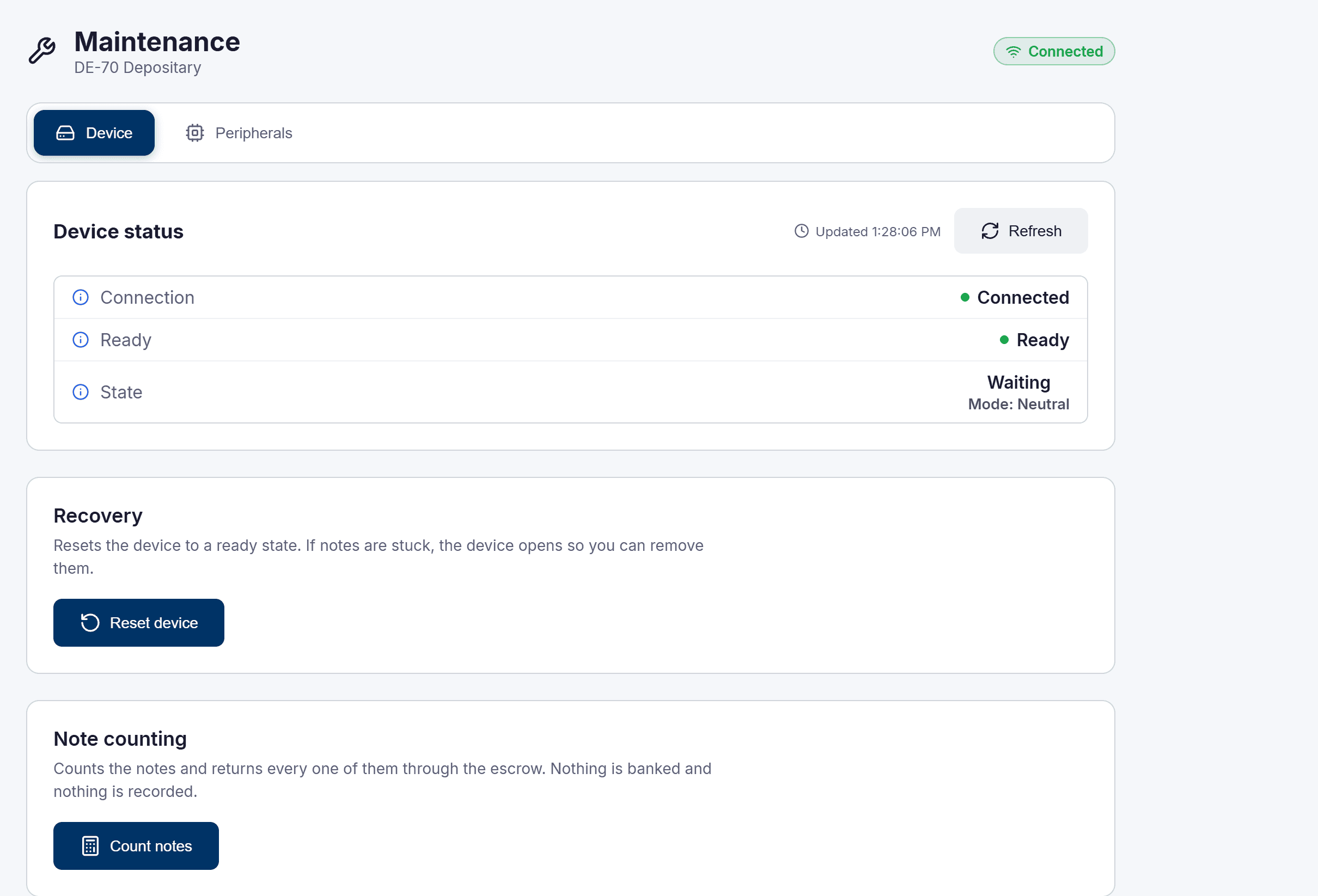
When the DE-70 is ready, Connection says Connected, Ready says Ready, and State says Waiting with Mode: Neutral.
| What you see | What to do |
|---|---|
| Ready says Notes in the escrow | Notes were left in the escrow (for example, a batch given back that nobody took). Tap Reset device and take the notes out when the escrow opens. |
| Ready says Busy, or State is not Waiting with Mode: Neutral | The DE-70 is still doing something, or it stopped halfway. Wait a few seconds and tap Refresh. If it stays like that, tap Reset device. |
| Error says "Device in abnormal_device state" or "Device in storing_error state" | The DE-70 stopped with an error. Tap Reset device and follow the screen, as in When the DE-70 stops with an error |
| "The machine is not saying what it is doing — another operation may still be holding it. The reset below is available anyway: it is what ends that." | Tap Reset device. |
| Reset device is greyed out | It waits while the state is being read, and while the DE-70 is not connected. Wait, or check the connection. |
| Deposit recovered — "The deposit … interrupted by the error was completed by the recovery: … entered the safe…" | The reset finished a deposit that an error had interrupted. Its receipt can be printed again from Reports |
| Deposit pending review — "… was counted and did not go back into the machine. The amount did not enter the safe…" | The counted notes were not put back. The DE-70 stays held: see An error in the middle of an operation |
| Machine released — "… was put into the escrow and stored…" | The DE-70 was owed a batch, and it went in: the DE-70 is back in service. |
| Last error reported by the device shows a code | It is the last error the DE-70 reported, with when it happened. The DE-70 sends no guide picture. Note the code for the ticket if the error comes back. |
| Could not read the inventory (on the Inventory screen) | Tap Retry. If it fails again, check the Maintenance screen: the DE-70 must be connected and ready. |
Note counting
| What you see | What to do |
|---|---|
| Count notes does not appear on the Maintenance screen, or is greyed out | It appears only to profiles with the Counting permission (in a new installation: Administrator, Manager and Technician). Greyed out, the DE-70 is not connected or not answering: see The DE-70 shows as disconnected |
| Could not start counting, with the reason | The DE-70 must be at rest. Tap Reset device on the Maintenance screen, then try again. |
| Escrow full — "The escrow is full. Take the notes out of it and the count carries on with what is still in the feeder…" | Take the notes out of the escrow and tap Empty the escrow and continue. The total so far is kept. |
| Notes in the reject bin or Reject bin full — "Remove the rejected notes from the reject bin to keep counting." | Take the notes out of the reject tray. |
| Could not empty the escrow or Could not end the count, or Device error during the count | Take the notes out of the escrow and the feeder, tap Reset device on the Maintenance screen and count again. Nothing is ever stored during a count. |
| "The count slip did NOT print. Check the printer — a count leaves no record that can be reprinted later." | Check the printer (see Printer and receipts) and count again if you need the slip. |
| The next operation does not start after a count | Notes left in the escrow block it: take them out as Maintenance and the reset above shows |
When the DE-70 is held
After some of the problems above, the DE-70 is held: the home screen shows Needs reconciliation, and its money operations do not start until someone checks it. The Maintenance and Inventory screens still open. What to do, step by step: An error in the middle of an operation
Not solved?
Open a ticket with a photo of the screen and, if there was an operation, its reference. Attach the logs that come checked in Settings › Support (above all, the Glory Device Connection Logs), from the day before the problem until today. More about the logs: Which logs to send, and which days
Network and internet
What Settings › Network shows, no internet, GLORY's server not answering, Wi-Fi, a network that blocks the way out, DNS, a fixed address, and what works without internet.
Cash Infinity
Connecting the Cash Infinity, the states and codes it reports, and what to do with each message it shows in an operation or in maintenance.